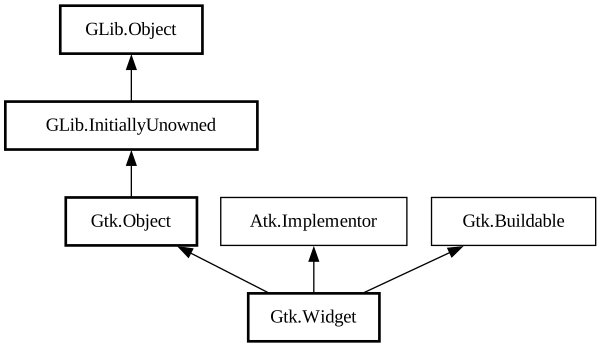
The base class for all widgets.
It manages the widget lifecycle, layout, states and style.
### Minimum and natural size
In order to understand geometry management of widgets in GTK, it is helpful to understand the different terminology surrounding sizing of
widgets.
The two primary terms are: *minimum size* and *natural size*.
As a general rule: the *minimum size* is the size required to display the minimum amount of content in a widget. A widget cannot be
allocated less than the minimum size it requires.
The *natural size* is the amount of content that a widget prefers to display in normal conditions.
A widget may be allocated more than the natural size it prefers, or less, depending on the layout management of its parent container.
What to do when the widget is allocated a different size than the one it prefers is entirely left to the widget implementation: some
widgets decide to add extra room, other widgets may disclose additional content, other widgets may decide to hide content, or show a
different layout entirely.
### Height-for-width Geometry Management
GTK uses a height-for-width (and width-for-height) geometry management system. Height-for-width means that a widget can change how much
vertical space it needs, depending on the amount of horizontal space that it is given (and similar for width-for-height). The most common
example is a label that reflows to fill up the available width, wraps to fewer lines, and therefore needs less height.
Height-for-width geometry management is implemented in GTK by way of two virtual methods:
- [vfunc@Gtk.Widget.get_request_mode]
- [vfunc@Gtk.Widget.measure]
There are some important things to keep in mind when implementing height-for-width and when using it in widget implementations.
If you implement a direct `GtkWidget` subclass that supports height-for-width or width-for-height geometry management for itself or its
child widgets, the [vfunc@Gtk.Widget.get_request_mode] virtual function must be implemented as well and return the widget's preferred
request mode. The default implementation of this virtual function returns gtk_size_request_constant_size
, which means that the widget will only ever get -1 passed as the for_size value to its [vfunc@Gtk.Widget.measure] implementation.
The geometry management system will query a widget hierarchy in only one orientation at a time. When widgets are initially queried for
their minimum sizes it is generally done in two initial passes in the [enum@Gtk.SizeRequestMode] chosen by the toplevel.
For example, when queried in the normal gtk_size_request_height_for_width mode:
First, the default minimum and natural width for each widget in the interface will be computed using [method@Gtk.Widget.measure] with an
orientation of gtk_orientation_horizontal and a for_size of -1. Because the preferred widths for each
widget depend on the preferred widths of their children, this information propagates up the hierarchy, and finally a minimum and natural
width is determined for the entire toplevel. Next, the toplevel will use the minimum width to query for the minimum height contextual to
that width using [method@Gtk.Widget.measure] with an orientation of gtk_orientation_vertical and a
for_size of the just computed width. This will also be a highly recursive operation. The minimum height for the minimum width is normally
used to set the minimum size constraint on the toplevel.
After the toplevel window has initially requested its size in both dimensions it can go on to allocate itself a reasonable size (or a
size previously specified with [method@Gtk.Window.set_default_size]). During the recursive allocation process it’s important to note
that request cycles will be recursively executed while widgets allocate their children. Each widget, once allocated a size, will go on to
first share the space in one orientation among its children and then request each child's height for its target allocated width or its
width for allocated height, depending. In this way a widget will typically be requested its size a number of times before actually being
allocated a size. The size a widget is finally allocated can of course differ from the size it has requested. For this reason, `GtkWidget`
caches a small number of results to avoid re-querying for the same sizes in one allocation cycle.
If a widget does move content around to intelligently use up the allocated size then it must support the request in both
`GtkSizeRequestMode`s even if the widget in question only trades sizes in a single orientation.
For instance, a [class@Gtk.Label] that does height-for-width word wrapping will not expect to have [vfunc@Gtk.Widget.measure] with an
orientation of gtk_orientation_vertical called because that call is specific to a width-for-height
request. In this case the label must return the height required for its own minimum possible width. By following this rule any widget that
handles height-for-width or width-for-height requests will always be allocated at least enough space to fit its own content.
Here are some examples of how a gtk_size_request_height_for_width widget generally deals with
width-for-height requests:
```c static void foo_widget_measure (GtkWidget *widget, GtkOrientation orientation, int for_size, int *minimum_size, int
*natural_size, int *minimum_baseline, int *natural_baseline) { if (orientation == GTK_ORIENTATION_HORIZONTAL) { // Calculate minimum
and natural width } else // VERTICAL { if (i_am_in_height_for_width_mode) { int min_width, dummy;
// First, get the minimum width of our widget GTK_WIDGET_GET_CLASS (widget)->measure (widget, GTK_ORIENTATION_HORIZONTAL, -1, &
min_width, &dummy, &dummy, &dummy);
// Now use the minimum width to retrieve the minimum and natural height to display // that width. GTK_WIDGET_GET_CLASS (widget)->
measure (widget, GTK_ORIENTATION_VERTICAL, min_width, minimum_size, natural_size, &dummy, &dummy); } else { // ... some
widgets do both. } } } ```
Often a widget needs to get its own request during size request or allocation. For example, when computing height it may need to also
compute width. Or when deciding how to use an allocation, the widget may need to know its natural size. In these cases, the widget should
be careful to call its virtual methods directly, like in the code example above.
It will not work to use the wrapper function [method@Gtk.Widget.measure] inside your own [vfunc@Gtk.Widget.size_allocate] implementation.
These return a request adjusted by [class@Gtk.SizeGroup], the widget's align and expand flags, as well as its CSS style.
If a widget used the wrappers inside its virtual method implementations, then the adjustments (such as widget margins) would be applied
twice. GTK therefore does not allow this and will warn if you try to do it.
Of course if you are getting the size request for another widget, such as a child widget, you must use [method@Gtk.Widget.measure];
otherwise, you would not properly consider widget margins, [class@Gtk.SizeGroup], and so forth.
GTK also supports baseline vertical alignment of widgets. This means that widgets are positioned such that the typographical baseline of
widgets in the same row are aligned. This happens if a widget supports baselines, has a vertical alignment using baselines, and is inside
a widget that supports baselines and has a natural “row” that it aligns to the baseline, or a baseline assigned to it by the
grandparent.
Baseline alignment support for a widget is also done by the [vfunc@Gtk.Widget.measure] virtual function. It allows you to report both a
minimum and natural size.
If a widget ends up baseline aligned it will be allocated all the space in the parent as if it was
gtk_align_fill, but the selected baseline can be found via [method@Gtk.Widget.get_baseline]. If the baseline has a value other
than -1 you need to align the widget such that the baseline appears at the position.
### GtkWidget as GtkBuildable
The `GtkWidget` implementation of the `GtkBuildable` interface supports various custom elements to specify additional aspects of widgets
that are not directly expressed as properties.
If the widget uses a [class@Gtk.LayoutManager], `GtkWidget` supports a custom `<layout>` element, used to define layout properties:
```xml <object class="GtkGrid" id="my_grid"> <child> <object class="GtkLabel" id="label1"> <property name="label"
>Description</property> <layout> <property name="column">0</property> <property name="row">0<
/property> <property name="row-span">1</property> <property name="column-span">1</property> </layout>
</object> </child> <child> <object class="GtkEntry" id="description_entry"> <layout> <property
name="column">1</property> <property name="row">0</property> <property name="row-span">1</property>
<property name="column-span">1</property> </layout> </object> </child> </object> ```
`GtkWidget` allows style information such as style classes to be associated with widgets, using the custom `<style>` element:
```xml <object class="GtkButton" id="button1"> <style> <class name="my-special-button-class"/> <class
name="dark-button"/> </style> </object> ```
`GtkWidget` allows defining accessibility information, such as properties, relations, and states, using the custom `<accessibility>
` element:
```xml <object class="GtkButton" id="button1"> <accessibility> <property name="label">Download</property> <
relation name="labelled-by">label1</relation> </accessibility> </object> ```
### Building composite widgets from template XML
`GtkWidget `exposes some facilities to automate the procedure of creating composite widgets using "templates".
To create composite widgets with `GtkBuilder` XML, one must associate the interface description with the widget class at class
initialization time using [method@Gtk.WidgetClass.set_template].
The interface description semantics expected in composite template descriptions is slightly different from regular [class@Gtk.Builder]
XML.
Unlike regular interface descriptions, [method@Gtk.WidgetClass.set_template] will expect a `<template>` tag as a direct child of
the toplevel `<interface>` tag. The `<template>` tag must specify the “class” attribute which must be the type name of the
widget. Optionally, the “parent” attribute may be specified to specify the direct parent type of the widget type; this is ignored by
`GtkBuilder` but can be used by UI design tools to introspect what kind of properties and internal children exist for a given type when
the actual type does not exist.
The XML which is contained inside the `<template>` tag behaves as if it were added to the `<object>` tag defining the widget
itself. You may set properties on a widget by inserting `<property>` tags into the `<template>` tag, and also add `<child
>` tags to add children and extend a widget in the normal way you would with `<object>` tags.
Additionally, `<object>` tags can also be added before and after the initial `<template>` tag in the normal way, allowing one
to define auxiliary objects which might be referenced by other widgets declared as children of the `<template>` tag.
Since, unlike the `<object>` tag, the `<template>` tag does not contain an “id” attribute, if you need to refer to the
instance of the object itself that the template will create, simply refer to the template class name in an applicable element content.
Here is an example of a template definition, which includes an example of this in the `<signal>` tag:
```xml <interface> <template class="FooWidget" parent="GtkBox"> <property name="orientation">horizontal</property
> <property name="spacing">4</property> <child> <object class="GtkButton" id="hello_button"> <property
name="label">Hello World</property> <signal name="clicked" handler="hello_button_clicked" object="FooWidget" swapped="yes"/
> </object> </child> <child> <object class="GtkButton" id="goodbye_button"> <property name="label">
Goodbye World</property> </object> </child> </template> </interface> ```
Typically, you'll place the template fragment into a file that is bundled with your project, using `GResource`. In order to load the
template, you need to call [method@Gtk.WidgetClass.set_template_from_resource] from the class initialization of your `GtkWidget` type:
```c static void foo_widget_class_init (FooWidgetClass *klass) { // ...
gtk_widget_class_set_template_from_resource (GTK_WIDGET_CLASS (klass), "/com/example/ui/foowidget.ui"); } ```
You will also need to call [method@Gtk.Widget.init_template] from the instance initialization function:
```c static void foo_widget_init (FooWidget *self) { gtk_widget_init_template (GTK_WIDGET (self));
// Initialize the rest of the widget... } ```
as well as calling [method@Gtk.Widget.dispose_template] from the dispose function:
```c static void foo_widget_dispose (GObject *gobject) { FooWidget *self = FOO_WIDGET (gobject);
// Dispose objects for which you have a reference...
// Clear the template children for this widget type gtk_widget_dispose_template (GTK_WIDGET (self), FOO_TYPE_WIDGET);
G_OBJECT_CLASS (foo_widget_parent_class)->dispose (gobject); } ```
You can access widgets defined in the template using the [method@Gtk.Widget.get_template_child] function, but you will typically declare
a pointer in the instance private data structure of your type using the same name as the widget in the template definition, and call [
method@Gtk.WidgetClass.bind_template_child_full] (or one of its wrapper macros [func@Gtk.widget_class_bind_template_child] and [
func@Gtk.widget_class_bind_template_child_private]) with that name, e.g.
```c typedef struct { GtkWidget *hello_button; GtkWidget *goodbye_button; } FooWidgetPrivate;
G_DEFINE_TYPE_WITH_PRIVATE (FooWidget, foo_widget, GTK_TYPE_BOX)
static void foo_widget_dispose (GObject *gobject) { gtk_widget_dispose_template (GTK_WIDGET (gobject), FOO_TYPE_WIDGET);
G_OBJECT_CLASS (foo_widget_parent_class)->dispose (gobject); }
static void foo_widget_class_init (FooWidgetClass *klass) { // ... G_OBJECT_CLASS (klass)->dispose = foo_widget_dispose;
gtk_widget_class_set_template_from_resource (GTK_WIDGET_CLASS (klass), "/com/example/ui/foowidget.ui");
gtk_widget_class_bind_template_child_private (GTK_WIDGET_CLASS (klass), FooWidget, hello_button);
gtk_widget_class_bind_template_child_private (GTK_WIDGET_CLASS (klass), FooWidget, goodbye_button); }
static void foo_widget_init (FooWidget *widget) { gtk_widget_init_template (GTK_WIDGET (widget)); } ```
You can also use [method@Gtk.WidgetClass.bind_template_callback_full] (or is wrapper macro [func@Gtk.widget_class_bind_template_callback]
) to connect a signal callback defined in the template with a function visible in the scope of the class, e.g.
```c // the signal handler has the instance and user data swapped // because of the swapped="yes" attribute in the template XML static
void hello_button_clicked (FooWidget *self, GtkButton *button) { g_print ("Hello, world!\n"); }
static void foo_widget_class_init (FooWidgetClass *klass) { // ... gtk_widget_class_set_template_from_resource (GTK_WIDGET_CLASS (klass
), "/com/example/ui/foowidget.ui"); gtk_widget_class_bind_template_callback (GTK_WIDGET_CLASS (klass), hello_button_clicked); } ```
- public bool activate ()
Activates the widget.
- public void add_accelerator (string accel_signal, AccelGroup accel_group, uint accel_key, ModifierType accel_mods, AccelFlags accel_flags)
Installs an accelerator for this this
in accel_group that causes accel_signal to be emitted if the accelerator is activated.
- public void add_events (int events)
Adds the events in the bitfield events to the event mask
for this.
- public void add_mnemonic_label (Widget label)
Adds a widget to the list of mnemonic labels for this widget.
- public bool child_focus (DirectionType direction)
Called by widgets as the user moves around the window using keyboard
shortcuts.
- public void class_path (out uint path_length, out string path, out string path_reversed)
Same as path, but
always uses the name of a widget’s type, never uses a custom name set with gtk_widget_set_name.
- public Context create_pango_context ()
Creates a new `PangoContext` that is configured for the widget.
- public Layout create_pango_layout (string? text)
Creates a new `PangoLayout` that is configured for the widget.
- public void destroyed (out unowned Widget widget_pointer)
This function sets *widget_pointer to
null if widget_pointer != null.
- public virtual void dispatch_child_properties_changed (out ParamSpec[] pspecs)
Seldomly overidden.
- public void ensure_style ()
Ensures that this has a style (
this->style).
- public void error_bell ()
Notifies the user about an input-related error on the widget.
- public class unowned ParamSpec find_style_property (string property_name)
Finds a style property of a widget class by name.
- public void freeze_child_notify ()
- public virtual unowned Object get_accessible ()
Returns the accessible object that describes the widget to an
assistive technology.
- public void get_allocation (out Allocation allocation)
Retrieves the widget’s allocation.
- public unowned Widget get_ancestor (Type widget_type)
Gets the first ancestor of the widget with type widget_type
.
- public bool get_app_paintable ()
Determines whether the application intends to draw on the widget in an
GtkWidget::draw handler.
- public bool get_can_default ()
Determines whether this can be a
default widget.
- public bool get_can_focus ()
Determines whether the input focus can enter the widget or any of its
children.
- public void get_child_requisition (out Requisition requisition)
This function is only for use in widget implementations.
- public bool get_child_visible ()
Gets the value set with [method@Gtk.
- public unowned Clipboard get_clipboard (Atom selection)
Gets the clipboard object for the widget.
- public unowned Colormap get_colormap ()
- public string get_composite_name ()
Obtains the composite name of a widget.
- public TextDirection get_direction ()
Gets the reading direction for the widget.
- public unowned Display get_display ()
Get the display for the window that the widget belongs to.
- public bool get_double_buffered ()
Determines whether the widget is double buffered.
- public int get_events ()
Returns the event mask (see
EventMask) for the widget.
- public ExtensionMode get_extension_events ()
- public WidgetFlags get_flags ()
- public bool get_has_tooltip ()
Returns the current value of the `has-tooltip` property.
- public bool get_has_window ()
Determines whether this has a
Window of its own.
- public bool get_mapped ()
Returns whether the widget is mapped.
- public unowned RcStyle get_modifier_style ()
Returns the current modifier style for the widget.
- public bool get_no_show_all ()
Returns the current value of the
no_show_all property, which determines whether calls to
show_all will affect this widget.
- public unowned Context get_pango_context ()
Gets a `PangoContext` that is configured for the widget.
- public unowned Container? get_parent ()
Returns the parent widget of the widget.
- public unowned Window get_parent_window ()
Gets this’s parent window, or
null if it does not have one.
- public void get_pointer (out int x, out int y)
Obtains the location of the mouse pointer in widget coordinates.
- public bool get_realized ()
Determines whether the widget is realized.
- public bool get_receives_default ()
Determines whether the widget is always treated as the default widget
within its toplevel when it has the focus, even if another widget is the default.
- public Requisition get_requisition ()
Retrieves the widget’s requisition.
- public unowned Window get_root_window ()
Get the root window where this widget is located.
- public unowned Screen get_screen ()
Get the Screen
from the toplevel window associated with this widget.
- public bool get_sensitive ()
Returns the widget’s sensitivity.
- public unowned Settings get_settings ()
Gets the settings object holding the settings used for the widget.
- public void get_size_request (out int width, out int height)
Gets the size request that was explicitly set for the widget.
- public unowned Pixmap get_snapshot (Rectangle clip_rect)
- public StateType get_state ()
Returns the widget’s state.
- public unowned Style get_style ()
Simply an accessor function that returns
this->style.
- public string get_tooltip_markup ()
Gets the contents of the tooltip for the widget.
- public string get_tooltip_text ()
Gets the contents of the tooltip for the widget.
- public unowned Window get_tooltip_window ()
Returns the Window of the
current tooltip.
- public unowned Widget get_toplevel ()
This function returns the topmost widget in the container hierarchy
this is a part of.
- public bool get_visible ()
Determines whether the widget is visible.
- public unowned Visual get_visual ()
Gets the visual that will be used to render
this.
- public unowned Window get_window ()
Returns the widget’s window if it is realized,
null otherwise
- public void grab_default ()
Causes this to become the default
widget.
- public bool has_grab ()
- public bool has_rc_style ()
Determines if the widget style has been looked up through the rc
mechanism.
- public bool has_screen ()
Checks whether there is a
Screen is associated with this widget.
- public virtual void hide_all ()
- public bool hide_on_delete ()
- public void input_shape_combine_mask (Bitmap? shape_mask, int offset_x, int offset_y)
- public class void install_style_property (ParamSpec pspec)
Installs a style property on a widget class.
- public class void install_style_property_parser (ParamSpec pspec, RcPropertyParser parser)
Installs a style property on a widget class.
- public bool intersect (Rectangle area, out Rectangle? intersection = null)
Computes the intersection of a this
’s area and area, storing the intersection in intersection, and returns true
if there was an intersection.
- public bool is_ancestor (Widget ancestor)
Determines whether the widget is a descendent of ancestor
.
- public bool is_composited ()
Whether this can rely on having its
alpha channel drawn correctly.
- public bool is_double_buffered ()
- public bool is_drawable ()
- public bool is_mapped ()
- public bool is_no_window ()
- public bool is_parent_sensitive ()
- public bool is_rc_style ()
- public bool is_realized ()
- public bool is_sensitive ()
Returns the widget’s effective sensitivity.
- public bool is_toplevel ()
- public List<unowned Closure> list_accel_closures ()
- public List<unowned Widget> list_mnemonic_labels ()
Returns the widgets for which this widget is the target of a mnemonic.
- public class (unowned ParamSpec)[] list_style_properties ()
Returns all style properties of a widget class.
- public void modify_base (StateType state, Color? color)
Sets the base color for a widget in a particular state.
- public void modify_bg (StateType state, Color? color)
Sets the background color for a widget in a particular state.
- public void modify_cursor (Color? primary, Color? secondary)
Sets the cursor color to use in a widget, overriding the
Widget cursor-color and secondary-cursor-color style properties.
- public void modify_fg (StateType state, Color? color)
Sets the foreground color for a widget in a particular state.
- public void modify_font (FontDescription? font_desc)
Sets the font to use for a widget.
- public void modify_style (RcStyle style)
Modifies style values on the widget.
- public void modify_text (StateType state, Color? color)
Sets the text color for a widget in a particular state.
- public void path (out uint path_length, out string path, out string path_reversed)
Obtains the full path to this.
- public void queue_draw ()
Schedules this widget to be redrawn.
- public void queue_draw_area (int x, int y, int width, int height)
Convenience function that calls gtk_widget_queue_draw_region
on the region created from the given coordinates.
- public void queue_resize ()
Flags a widget to have its size renegotiated.
- public void queue_resize_no_redraw ()
This function works like
queue_resize, except that the widget is not invalidated.
- public Region region_intersect (Region region)
Computes the intersection of a this
’s area and region, returning the intersection.
- public bool remove_accelerator (AccelGroup accel_group, uint accel_key, ModifierType accel_mods)
Removes an accelerator from this,
previously installed with add_accelerator.
- public void remove_mnemonic_label (Widget label)
Removes a widget from the list of mnemonic labels for this widget.
- public Pixbuf render_icon (string stock_id, IconSize size, string? detail)
A convenience function that uses the theme settings for
this to look up stock_id and render it to a pixbuf.
- public void reparent (Widget new_parent)
Moves a widget from one
Container to another, handling reference count issues to avoid destroying the widget.
- public void reset_rc_styles ()
Reset the styles of this and all
descendents, so when they are looked up again, they get the correct values for the currently loaded RC file settings.
- public void reset_shapes ()
- public int send_expose (Event event)
Very rarely-used function.
- public bool send_focus_change (Event event)
Sends the focus change event to
this
- public void set_accel_path (string accel_path, AccelGroup accel_group)
Given an accelerator group, accel_group, and an
accelerator path, accel_path, sets up an accelerator in accel_group so whenever the key binding that is
defined for accel_path is pressed, this will be activated.
- public void set_allocation (Allocation allocation)
Sets the widget’s allocation.
- public void set_app_paintable (bool app_paintable)
Sets whether the application intends to draw on the widget in an
GtkWidget::draw handler.
- public void set_can_default (bool can_default)
Specifies whether this can be a
default widget.
- public void set_can_focus (bool can_focus)
Sets whether the input focus can enter the widget or any of its
children.
- public void set_child_visible (bool is_visible)
Sets whether the widget should be mapped along with its parent.
- public void set_colormap (Colormap colormap)
- public void set_composite_name (string name)
Sets a widgets composite name.
- public void set_direction (TextDirection dir)
Sets the reading direction on the widget.
- public void set_double_buffered (bool double_buffered)
Widgets are double buffered by default; you can use this function to
turn off the buffering.
- public void set_events (int events)
Sets the event mask (see
EventMask) for a widget.
- public void set_extension_events (ExtensionMode mode)
- public void set_flags (WidgetFlags flags)
- public void set_has_tooltip (bool has_tooltip)
Sets the `has-tooltip` property on the widget.
- public void set_has_window (bool has_window)
Specifies whether this has a
Window of its own.
- public void set_mapped (bool mapped)
Marks the widget as being mapped.
- public void set_no_show_all (bool no_show_all)
Sets the
no_show_all property, which determines whether calls to show_all
will affect this widget.
- public void set_parent (Container parent)
Sets the parent widget of the widget.
- public void set_parent_window (Window parent_window)
Sets a non default parent window for this
.
- public void set_realized (bool realized)
Marks the widget as being realized.
- public void set_receives_default (bool receives_default)
Sets whether the widget will be treated as the default widget within
its toplevel when it has the focus, even if another widget is the default.
- public void set_redraw_on_allocate (bool redraw_on_allocate)
Sets whether the entire widget is queued for drawing when its size
allocation changes.
- public bool set_scroll_adjustments (Adjustment? hadjustment, Adjustment? vadjustment)
- public void set_sensitive (bool sensitive)
Sets the sensitivity of the widget.
- public void set_size_request (int width, int height)
Sets the minimum size of the widget.
- public void set_state (StateType state)
This function is for use in widget implementations.
- public void set_style (Style? style)
Used to set the Style for a
widget (this->style).
- public void set_tooltip_markup (string markup)
Sets the contents of the tooltip for widget.
- public void set_tooltip_text (string text)
Sets the contents of the tooltip for the widget.
- public void set_tooltip_window (Window custom_window)
Replaces the default window used for displaying tooltips with
custom_window.
- public void set_visible (bool visible)
Sets the visibility state of this.
- public void set_window (Window window)
Sets a widget’s window.
- public void shape_combine_mask (Bitmap? shape_mask, int offset_x, int offset_y)
- public virtual void show_all ()
Recursively shows a widget, and any child widgets (if the widget is a
container).
- public void show_now ()
Shows a widget.
- public void style_attach ()
This function attaches the widget’s
Style to the widget's Window.
- public void style_get (...)
Gets the values of a multiple style properties of
this.
- public void style_get_property (string property_name, ref Value value)
Gets the value of a style property of this
.
- public void style_get_valist (string first_property_name, va_list var_args)
- public void thaw_child_notify ()
- public bool translate_coordinates (Widget dest_widget, int src_x, int src_y, out int dest_x, out int dest_y)
Translates coordinates relative to this
’s allocation to coordinates relative to dest_widget’s allocations.
- public void trigger_tooltip_query ()
Triggers a tooltip query on the display of the widget.
- public void unparent ()
Removes this from its parent.
- public void unset_flags (WidgetFlags flags)