FileChooserDialog
Object Hierarchy:
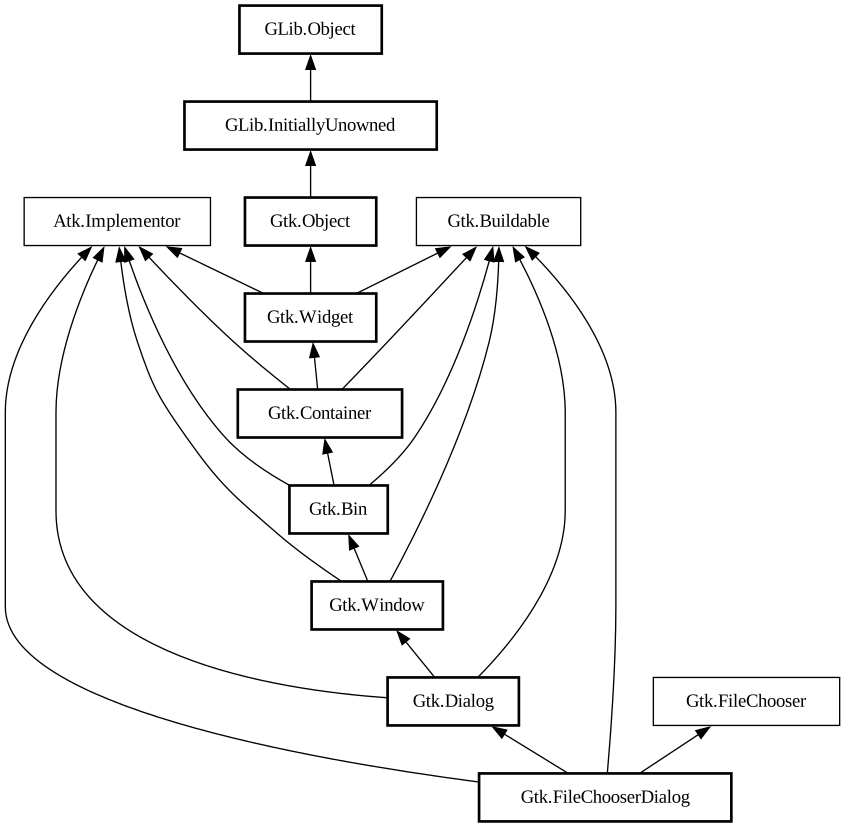
Description:
`GtkFileChooserDialog` is a dialog suitable for use with “File Open” or “File Save” commands.
Note:
Use [class@Gtk.FileDialog] instead

This widget works by putting a [class@Gtk.FileChooserWidget] inside a [class@Gtk.Dialog]. It exposes the [iface@Gtk.FileChooser] interface, so you can use all of the [iface@Gtk.FileChooser] functions on the file chooser dialog as well as those for [class@Gtk.Dialog].
Note that `GtkFileChooserDialog` does not have any methods of its own. Instead, you should use the functions that work on a [ iface@Gtk.FileChooser].
If you want to integrate well with the platform you should use the [class@Gtk.FileChooserNative] API, which will use a platform-specific dialog if available and fall back to `GtkFileChooserDialog` otherwise.
Typical usage
In the simplest of cases, you can the following code to use `GtkFileChooserDialog` to select a file for opening:
```c static void on_open_response (GtkDialog *dialog, int response) { if (response == GTK_RESPONSE_ACCEPT) { GtkFileChooser *chooser = GTK_FILE_CHOOSER (dialog);
g_autoptr(GFile) file = gtk_file_chooser_get_file (chooser);
open_file (file); }
gtk_window_destroy (GTK_WINDOW (dialog)); }
// ... GtkWidget *dialog; GtkFileChooserAction action = GTK_FILE_CHOOSER_ACTION_OPEN;
dialog = gtk_file_chooser_dialog_new ("Open File", parent_window, action, _("_Cancel"), GTK_RESPONSE_CANCEL, _("_Open"), GTK_RESPONSE_ACCEPT, NULL);
gtk_window_present (GTK_WINDOW (dialog));
g_signal_connect (dialog, "response", G_CALLBACK (on_open_response), NULL); ```
To use a dialog for saving, you can use this:
```c static void on_save_response (GtkDialog *dialog, int response) { if (response == GTK_RESPONSE_ACCEPT) { GtkFileChooser *chooser = GTK_FILE_CHOOSER (dialog);
g_autoptr(GFile) file = gtk_file_chooser_get_file (chooser);
save_to_file (file); }
gtk_window_destroy (GTK_WINDOW (dialog)); }
// ... GtkWidget *dialog; GtkFileChooser *chooser; GtkFileChooserAction action = GTK_FILE_CHOOSER_ACTION_SAVE;
dialog = gtk_file_chooser_dialog_new ("Save File", parent_window, action, _("_Cancel"), GTK_RESPONSE_CANCEL, _("_Save"), GTK_RESPONSE_ACCEPT, NULL); chooser = GTK_FILE_CHOOSER (dialog);
if (user_edited_a_new_document) gtk_file_chooser_set_current_name (chooser, _("Untitled document")); else gtk_file_chooser_set_file ( chooser, existing_filename);
gtk_window_present (GTK_WINDOW (dialog));
g_signal_connect (dialog, "response", G_CALLBACK (on_save_response), NULL); ```
Setting up a file chooser dialog
There are various cases in which you may need to use a `GtkFileChooserDialog`:
- To select a file for opening, use gtk_file_chooser_action_open.
- To save a file for the first time, use gtk_file_chooser_action_save, and suggest a name such as “Untitled” with [method@Gtk.FileChooser.set_current_name].
- To save a file under a different name, use gtk_file_chooser_action_save, and set the existing file with [method@Gtk.FileChooser.set_file].
- To choose a folder instead of a file, use gtk_file_chooser_action_select_folder.
In general, you should only cause the file chooser to show a specific folder when it is appropriate to use [ method@Gtk.FileChooser.set_file], i.e. when you are doing a “Save As” command and you already have a file saved somewhere.
Response Codes
`GtkFileChooserDialog` inherits from [class@Gtk.Dialog], so buttons that go in its action area have response codes such as gtk_response_accept and gtk_response_cancel. For example, you could call [ctor@Gtk.FileChooserDialog.new] as follows:
```c GtkWidget *dialog; GtkFileChooserAction action = GTK_FILE_CHOOSER_ACTION_OPEN;
dialog = gtk_file_chooser_dialog_new ("Open File", parent_window, action, _("_Cancel"), GTK_RESPONSE_CANCEL, _("_Open"), GTK_RESPONSE_ACCEPT, NULL); ```
This will create buttons for “Cancel” and “Open” that use predefined response identifiers from [enum@Gtk.ResponseType]. For most dialog boxes you can use your own custom response codes rather than the ones in [enum@Gtk.ResponseType], but `GtkFileChooserDialog` assumes that its “accept”-type action, e.g. an “Open” or “Save” button, will have one of the following response codes:
- gtk_response_accept
- gtk_response_ok
- gtk_response_yes
- gtk_response_apply
This is because `GtkFileChooserDialog` must intercept responses and switch to folders if appropriate, rather than letting the dialog terminate — the implementation uses these known response codes to know which responses can be blocked if appropriate.
To summarize, make sure you use a predefined response code when you use `GtkFileChooserDialog` to ensure proper operation.
CSS nodes
`GtkFileChooserDialog` has a single CSS node with the name `window` and style class `.filechooser`.
Namespace: Gtk
Package: gtk+-2.0
Content:
Creation methods:
Inherited Members:
All known members inherited from class Gtk.Dialog
All known members inherited from class Gtk.Window
All known members inherited from class Gtk.Bin
All known members inherited from class Gtk.Container
All known members inherited from class Gtk.Widget
All known members inherited from class Gtk.Object
All known members inherited from class GLib.Object
All known members inherited from interface Atk.Implementor
All known members inherited from interface Gtk.Buildable
All known members inherited from interface Gtk.FileChooser