LinkButton
Object Hierarchy:
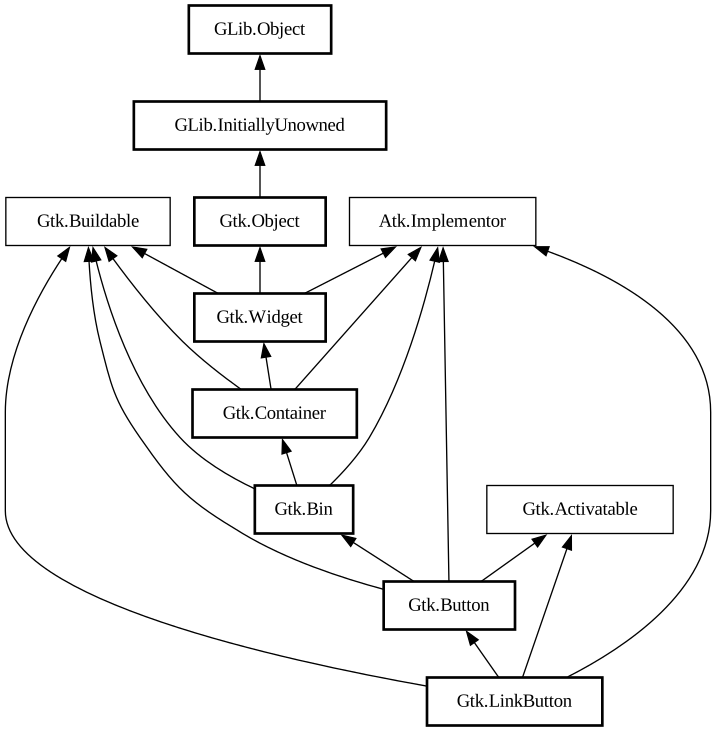
Description:
A button with a hyperlink.
<picture> <source srcset="link-button-dark.png" media="(prefers-color-scheme: dark)"> <img alt="An example GtkLinkButton" src="link-button.png"> </picture>
It is useful to show quick links to resources.
A link button is created by calling either [ctor@Gtk.LinkButton.new] or [ctor@Gtk.LinkButton.new_with_label]. If using the former, the URI you pass to the constructor is used as a label for the widget.
The URI bound to a `GtkLinkButton` can be set specifically using [method@Gtk.LinkButton.set_uri].
By default, `GtkLinkButton` calls [method@Gtk.FileLauncher.launch] when the button is clicked. This behaviour can be overridden by
connecting to the [signal@Gtk.LinkButton:GtkLinkButton:activate-link] signal and returning true
from the signal handler.
Shortcuts and Gestures
`GtkLinkButton` supports the following keyboard shortcuts:
- <kbd>Shift</kbd>+<kbd>F10</kbd> or <kbd>Menu</kbd> opens the context menu.
Actions
`GtkLinkButton` defines a set of built-in actions:
- `clipboard.copy` copies the url to the clipboard.
- `menu.popup` opens the context menu.
CSS nodes
`GtkLinkButton` has a single CSS node with name button. To differentiate it from a plain `GtkButton`, it gets the .link style class.
Accessibility
`GtkLinkButton` uses the [enum@Gtk.AccessibleRole.link] role.
Namespace: Gtk
Package: gtk+-2.0
Content:
Properties:
Static methods:
Creation methods:
Methods:
Inherited Members:
All known members inherited from class Gtk.Button
All known members inherited from class Gtk.Bin
All known members inherited from class Gtk.Container
All known members inherited from class Gtk.Widget
All known members inherited from class Gtk.Object
All known members inherited from class GLib.Object
All known members inherited from interface Atk.Implementor
All known members inherited from interface Gtk.Buildable
All known members inherited from interface Gtk.Activatable