DrawingArea
Object Hierarchy:
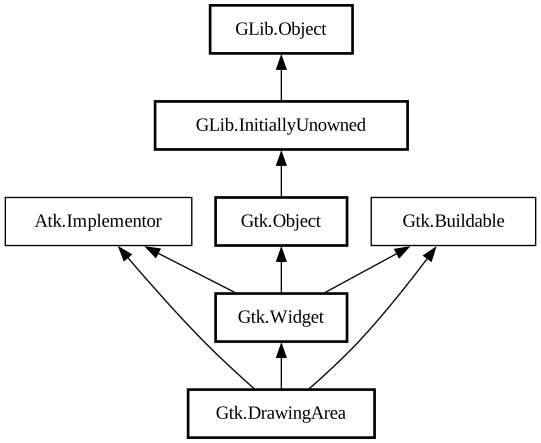
Description:
Allows drawing with cairo.
<picture> <source srcset="drawingarea-dark.png" media="(prefers-color-scheme: dark)"> <img alt="An example GtkDrawingArea" src="drawingarea.png"> </picture>
It’s essentially a blank widget; you can draw on it. After creating a drawing area, the application may want to connect to:
- The [signal@Gtk.Widget:
GtkDrawingArea:realize] signal to take any necessary actions when the widget is instantiated on a particular display. (Create GDK resources in response to this signal.) - The [signal@Gtk.DrawingArea:
GtkDrawingArea:resize] signal to take any necessary actions when the widget changes size. - Call [method@Gtk.DrawingArea.set_draw_func] to handle redrawing the contents of the widget.
The following code portion demonstrates using a drawing area to display a circle in the normal widget foreground color.
Simple GtkDrawingArea usage
```c static void draw_function (GtkDrawingArea *area, cairo_t *cr, int width, int height, gpointer data) { GdkRGBA color;
cairo_arc (cr, width / 2.0, height / 2.0, MIN (width, height) / 2.0, 0, 2 * G_PI);
gtk_widget_get_color (GTK_WIDGET (area), &color); gdk_cairo_set_source_rgba (cr, &color);
cairo_fill (cr); }
int main (int argc, char **argv) { gtk_init ();
GtkWidget *area = gtk_drawing_area_new (); gtk_drawing_area_set_content_width (GTK_DRAWING_AREA (area), 100); gtk_drawing_area_set_content_height (GTK_DRAWING_AREA (area), 100); gtk_drawing_area_set_draw_func (GTK_DRAWING_AREA (area), draw_function, NULL, NULL); return 0; } ```
The draw function is normally called when a drawing area first comes onscreen, or when it’s covered by another window and then uncovered. You can also force a redraw by adding to the “damage region” of the drawing area’s window using [ method@Gtk.Widget.queue_draw]. This will cause the drawing area to call the draw function again.
The available routines for drawing are documented in the Cairo documentation; GDK offers additional API to integrate with Cairo, like [func@Gdk.cairo_set_source_rgba] or [ func@Gdk.cairo_set_source_pixbuf].
To receive mouse events on a drawing area, you will need to use event controllers. To receive keyboard events, you will need to set the “can-focus” property on the drawing area, and you should probably draw some user-visible indication that the drawing area is focused.
If you need more complex control over your widget, you should consider creating your own `GtkWidget` subclass.
All known sub-classes:
Namespace: Gtk
Package: gtk+-2.0
Content:
Creation methods:
Fields:
Inherited Members:
All known members inherited from class Gtk.Widget
All known members inherited from class Gtk.Object
All known members inherited from class GLib.Object
All known members inherited from interface Atk.Implementor
All known members inherited from interface Gtk.Buildable