Fixed
Object Hierarchy:
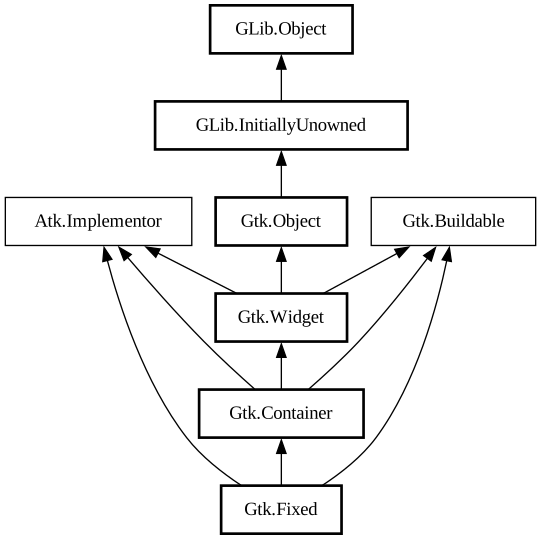
Description:
Places its child widgets at fixed positions and with fixed sizes.
`GtkFixed` performs no automatic layout management.
For most applications, you should not use this container! It keeps you from having to learn about the other GTK containers, but it results in broken applications. With `GtkFixed`, the following things will result in truncated text, overlapping widgets, and other display bugs:
- Themes, which may change widget sizes.
- Fonts other than the one you used to write the app will of course change the size of widgets containing text; keep in mind that users may use a larger font because of difficulty reading the default, or they may be using a different OS that provides different fonts.
- Translation of text into other languages changes its size. Also, display of non-English text will use a different font in many cases.
In addition, `GtkFixed` does not pay attention to text direction and thus may produce unwanted results if your app is run under right-to-left languages such as Hebrew or Arabic. That is: normally GTK will order containers appropriately for the text direction, e.g. to put labels to the right of the thing they label when using an RTL language, but it can’t do that with `GtkFixed`. So if you need to reorder widgets depending on the text direction, you would need to manually detect it and adjust child positions accordingly.
Finally, fixed positioning makes it kind of annoying to add/remove UI elements, since you have to reposition all the other elements. This is a long-term maintenance problem for your application.
If you know none of these things are an issue for your application, and prefer the simplicity of `GtkFixed`, by all means use the widget. But you should be aware of the tradeoffs.
Namespace: Gtk
Package: gtk+-2.0
Content:
Creation methods:
Methods:
Fields:
Inherited Members:
All known members inherited from class Gtk.Container
All known members inherited from class Gtk.Widget
All known members inherited from class Gtk.Object
All known members inherited from class GLib.Object
All known members inherited from interface Atk.Implementor
All known members inherited from interface Gtk.Buildable