- FileChooser
- action
- create_folders
- do_overwrite_confirmation
- extra_widget
- file_system_backend
- filter
- local_only
- preview_widget
- preview_widget_active
- select_multiple
- show_hidden
- use_preview_label
- error_quark
- add_filter
- add_shortcut_folder
- add_shortcut_folder_uri
- get_action
- get_create_folders
- get_current_folder
- get_current_folder_file
- get_current_folder_uri
- get_do_overwrite_confirmation
- get_extra_widget
- get_file
- get_filename
- get_filenames
- get_files
- get_filter
- get_local_only
- get_preview_file
- get_preview_filename
- get_preview_uri
- get_preview_widget
- get_preview_widget_active
- get_select_multiple
- get_show_hidden
- get_uri
- get_uris
- get_use_preview_label
- list_filters
- list_shortcut_folder_uris
- list_shortcut_folders
- remove_filter
- remove_shortcut_folder
- remove_shortcut_folder_uri
- select_all
- select_file
- select_filename
- select_uri
- set_action
- set_create_folders
- set_current_folder
- set_current_folder_file
- set_current_folder_uri
- set_current_name
- set_do_overwrite_confirmation
- set_extra_widget
- set_file
- set_filename
- set_filter
- set_local_only
- set_preview_widget
- set_preview_widget_active
- set_select_multiple
- set_show_hidden
- set_uri
- set_use_preview_label
- unselect_all
- unselect_file
- unselect_filename
- unselect_uri
- confirm_overwrite
- current_folder_changed
- file_activated
- selection_changed
- update_preview
FileChooser
Object Hierarchy:
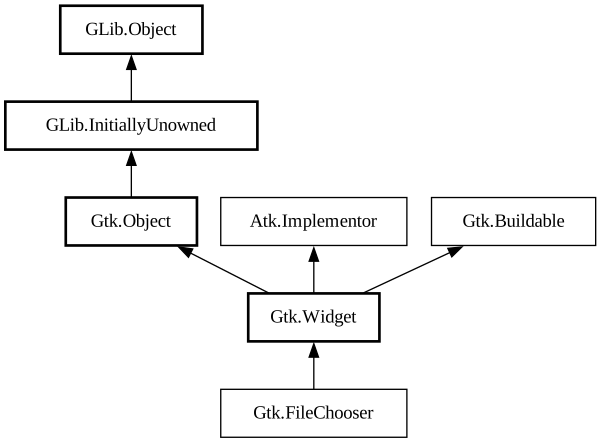
Description:
`GtkFileChooser` is an interface that can be implemented by file selection widgets.
Note:
Use [class@Gtk.FileDialog] instead
In GTK, the main objects that implement this interface are [class@Gtk.FileChooserWidget] and [class@Gtk.FileChooserDialog].
You do not need to write an object that implements the `GtkFileChooser` interface unless you are trying to adapt an existing file selector to expose a standard programming interface.
`GtkFileChooser` allows for shortcuts to various places in the filesystem. In the default implementation these are displayed in the left pane. It may be a bit confusing at first that these shortcuts come from various sources and in various flavours, so lets explain the terminology here:
- Bookmarks: are created by the user, by dragging folders from the right pane to the left pane, or by using the “Add”. Bookmarks can be renamed and deleted by the user.
- Shortcuts: can be provided by the application. For example, a Paint program may want to add a shortcut for a Clipart folder. Shortcuts cannot be modified by the user.
- Volumes: are provided by the underlying filesystem abstraction. They are the “roots” of the filesystem.
File Names and Encodings
When the user is finished selecting files in a `GtkFileChooser`, your program can get the selected filenames as `GFile`s.
Adding options
You can add extra widgets to a file chooser to provide options that are not present in the default design, by using [ method@Gtk.FileChooser.add_choice]. Each choice has an identifier and a user visible label; additionally, each choice can have multiple options. If a choice has no option, it will be rendered as a check button with the given label; if a choice has options, it will be rendered as a combo box.
All known implementing classes:
Namespace: Gtk
Package: gtk+-2.0
Content:
Properties:
- public FileChooserAction action { get; set; }
The type of operation that the file chooser is performing.
- public bool create_folders { get; set; }
Whether a file chooser not in gtk_file_chooser_action_open mode will offer the user to create new folders.
- public bool do_overwrite_confirmation { get; set; }
Whether a file chooser in gtk_file_chooser_action_save mode will present an overwrite confirmation dialog if the user selects a file name that already exists.
- public Widget extra_widget { get; set; }
- public string file_system_backend { construct; }
- public FileFilter filter { get; set; }
The current filter for selecting files that are displayed.
- public bool local_only { get; set; }
- public Widget preview_widget { get; set; }
- public bool preview_widget_active { get; set; }
- public bool select_multiple { get; set; }
Whether to allow multiple files to be selected.
- public bool show_hidden { get; set; }
- public bool use_preview_label { get; set; }
Static methods:
- public static Quark error_quark ()
Registers an error quark for `GtkFileChooser` errors.
Methods:
- public void add_filter (owned FileFilter filter)
Adds
filterto the list of filters that the user can select between. - public bool add_shortcut_folder (string folder) throws Error
Adds a folder to be displayed with the shortcut folders in a file chooser.
- public bool add_shortcut_folder_uri (string uri) throws Error
Adds a folder URI to be displayed with the shortcut folders in a file chooser.
- public FileChooserAction get_action ()
Gets the type of operation that the file chooser is performing.
- public bool get_create_folders ()
Gets whether file chooser will offer to create new folders.
- public string get_current_folder ()
Gets the current folder of this as `GFile`.
- public File get_current_folder_file ()
Gets the current folder of this as File.
- public string get_current_folder_uri ()
Gets the current folder of this as an URI.
- public bool get_do_overwrite_confirmation ()
Queries whether a file chooser is set to confirm for overwriting when the user types a file name that already exists.
- public unowned Widget get_extra_widget ()
Gets the current extra widget; see set_extra_widget.
- public File get_file ()
Gets the `GFile` for the currently selected file in the file selector.
- public string get_filename ()
Gets the filename for the currently selected file in the file selector.
- public SList<string> get_filenames ()
Lists all the selected files and subfolders in the current folder of this.
- public SList<File> get_files ()
Lists all the selected files and subfolders in the current folder of this as `GFile`.
- public unowned FileFilter get_filter ()
Gets the current filter.
- public bool get_local_only ()
Gets whether only local files can be selected in the file selector.
- public File get_preview_file ()
Gets the File that should be previewed in a custom preview Internal function, see get_preview_uri.
- public string get_preview_filename ()
Gets the filename that should be previewed in a custom preview widget.
- public string get_preview_uri ()
Gets the URI that should be previewed in a custom preview widget.
- public unowned Widget get_preview_widget ()
Gets the current preview widget; see set_preview_widget.
- public bool get_preview_widget_active ()
Gets whether the preview widget set by set_preview_widget should be shown for the current filename.
- public bool get_select_multiple ()
Gets whether multiple files can be selected in the file chooser.
- public bool get_show_hidden ()
Gets whether hidden files and folders are displayed in the file selector.
- public string get_uri ()
Gets the URI for the currently selected file in the file selector.
- public SList<string> get_uris ()
Lists all the selected files and subfolders in the current folder of this.
- public bool get_use_preview_label ()
Gets whether a stock label should be drawn with the name of the previewed file.
- public SList<unowned FileFilter> list_filters ()
Lists the current set of user-selectable filters; see add_filter, remove_filter.
- public SList<string>? list_shortcut_folder_uris ()
Queries the list of shortcut folders in the file chooser, as set by add_shortcut_folder_uri.
- public SList<string>? list_shortcut_folders ()
Queries the list of shortcut folders in the file chooser, as set by add_shortcut_folder.
- public void remove_filter (FileFilter filter)
Removes
filterfrom the list of filters that the user can select between. - public bool remove_shortcut_folder (string folder) throws Error
Removes a folder from the shortcut folders in a file chooser.
- public bool remove_shortcut_folder_uri (string uri) throws Error
Removes a folder URI from a file chooser’s list of shortcut folders.
- public void select_all ()
Selects all the files in the current folder of a file chooser.
- public bool select_file (File file) throws Error
Selects the file referred to by
file. - public bool select_filename (string filename)
Selects a filename.
- public bool select_uri (string uri)
Selects the file to by
uri. - public void set_action (FileChooserAction action)
Sets the type of operation that the chooser is performing.
- public void set_create_folders (bool create_folders)
Sets whether file chooser will offer to create new folders.
- public bool set_current_folder (string filename)
Sets the current folder for this from a `GFile`.
- public bool set_current_folder_file (File file) throws Error
Sets the current folder for this from a File.
- public bool set_current_folder_uri (string uri)
Sets the current folder for this from an URI.
- public void set_current_name (string name)
Sets the current name in the file selector, as if entered by the user.
- public void set_do_overwrite_confirmation (bool do_overwrite_confirmation)
Sets whether a file chooser in gtk_file_chooser_action_save mode will present a confirmation dialog if the user types a file name that already exists.
- public void set_extra_widget (Widget extra_widget)
Sets an application-supplied widget to provide extra options to the user.
- public bool set_file (File file) throws Error
Sets
fileas the current filename for the file chooser. - public bool set_filename (string filename)
Sets
filenameas the current filename for the file chooser, by changing to the file’s parent folder and actually selecting the file in list; all other files will be unselected. - public void set_filter (FileFilter filter)
Sets the current filter.
- public void set_local_only (bool local_only)
Sets whether only local files can be selected in the file selector.
- public void set_preview_widget (Widget preview_widget)
Sets an application-supplied widget to use to display a custom preview of the currently selected file.
- public void set_preview_widget_active (bool active)
Sets whether the preview widget set by set_preview_widget should be shown for the current filename.
- public void set_select_multiple (bool select_multiple)
Sets whether multiple files can be selected in the file chooser.
- public void set_show_hidden (bool show_hidden)
Sets whether hidden files and folders are displayed in the file selector.
- public bool set_uri (string uri)
Sets the file referred to by
urias the current file for the file chooser, by changing to the URI’s parent folder and actually selecting the URI in the list. - public void set_use_preview_label (bool use_label)
Sets whether the file chooser should display a stock label with the name of the file that is being previewed; the default is true.
- public void unselect_all ()
Unselects all the files in the current folder of a file chooser.
- public void unselect_file (File file)
Unselects the file referred to by
file. - public void unselect_filename (string filename)
Unselects a currently selected filename.
- public void unselect_uri (string uri)
Unselects the file referred to by
uri.
Signals:
- public signal FileChooserConfirmation confirm_overwrite ()
This signal gets emitted whenever it is appropriate to present a confirmation dialog when the user has selected a file name that already exists.
- public signal void current_folder_changed ()
This signal is emitted when the current folder in a FileChooser changes.
- public signal void file_activated ()
This signal is emitted when the user "activates" a file in the file chooser.
- public signal void selection_changed ()
This signal is emitted when there is a change in the set of selected files in a FileChooser.
- public signal void update_preview ()
This signal is emitted when the preview in a file chooser should be regenerated.
Inherited Members:
All known members inherited from class Gtk.Widget
- accel_closures_changed
- activate
- add_accelerator
- add_events
- add_mnemonic_label
- allocation
- app_paintable
- button_press_event
- button_release_event
- can_activate_accel
- can_default
- can_focus
- child_focus
- child_notify
- class_path
- client_event
- composite_child
- composited_changed
- configure_event
- create_pango_context
- create_pango_layout
- damage_event
- delete_event
- destroy_event
- destroyed
- direction_changed
- dispatch_child_properties_changed
- double_buffered
- drag_begin
- drag_data_delete
- drag_data_get
- drag_data_received
- drag_drop
- drag_end
- drag_failed
- drag_leave
- drag_motion
- ensure_style
- enter_notify_event
- error_bell
- event
- event_after
- events
- expose_event
- extension_events
- find_style_property
- focus
- focus_in_event
- focus_out_event
- freeze_child_notify
- get_accessible
- get_allocation
- get_ancestor
- get_app_paintable
- get_can_default
- get_can_focus
- get_child_requisition
- get_child_visible
- get_clipboard
- get_colormap
- get_composite_name
- get_default_colormap
- get_default_direction
- get_default_style
- get_default_visual
- get_direction
- get_display
- get_double_buffered
- get_events
- get_extension_events
- get_flags
- get_has_tooltip
- get_has_window
- get_mapped
- get_modifier_style
- get_no_show_all
- get_pango_context
- get_parent
- get_parent_window
- get_pointer
- get_realized
- get_receives_default
- get_requisition
- get_root_window
- get_screen
- get_sensitive
- get_settings
- get_size_request
- get_snapshot
- get_state
- get_style
- get_tooltip_markup
- get_tooltip_text
- get_tooltip_window
- get_toplevel
- get_visible
- get_visual
- get_window
- grab_broken_event
- grab_default
- grab_focus
- grab_notify
- has_default
- has_focus
- has_grab
- has_rc_style
- has_screen
- has_tooltip
- height_request
- hide
- hide_all
- hide_on_delete
- hierarchy_changed
- input_shape_combine_mask
- install_style_property
- install_style_property_parser
- intersect
- is_ancestor
- is_composited
- is_double_buffered
- is_drawable
- is_focus
- is_mapped
- is_no_window
- is_parent_sensitive
- is_rc_style
- is_realized
- is_sensitive
- is_toplevel
- key_press_event
- key_release_event
- keynav_failed
- leave_notify_event
- list_accel_closures
- list_mnemonic_labels
- list_style_properties
- map
- map_event
- mnemonic_activate
- modify_base
- modify_bg
- modify_cursor
- modify_fg
- modify_font
- modify_style
- modify_text
- motion_notify_event
- move_focus
- name
- no_expose_event
- no_show_all
- parent
- parent_set
- path
- pop_colormap
- pop_composite_child
- popup_menu
- property_notify_event
- proximity_in_event
- proximity_out_event
- push_colormap
- push_composite_child
- query_tooltip
- queue_draw
- queue_draw_area
- queue_resize
- queue_resize_no_redraw
- realize
- receives_default
- region_intersect
- remove_accelerator
- remove_mnemonic_label
- render_icon
- reparent
- requisition
- reset_rc_styles
- reset_shapes
- saved_state
- screen_changed
- scroll_event
- selection_clear_event
- selection_get
- selection_notify_event
- selection_received
- selection_request_event
- send_expose
- send_focus_change
- sensitive
- set_accel_path
- set_allocation
- set_app_paintable
- set_can_default
- set_can_focus
- set_child_visible
- set_colormap
- set_composite_name
- set_default_colormap
- set_default_direction
- set_direction
- set_double_buffered
- set_events
- set_extension_events
- set_flags
- set_has_tooltip
- set_has_window
- set_mapped
- set_no_show_all
- set_parent
- set_parent_window
- set_realized
- set_receives_default
- set_redraw_on_allocate
- set_scroll_adjustments
- set_scroll_adjustments_signal
- set_sensitive
- set_size_request
- set_state
- set_style
- set_tooltip_markup
- set_tooltip_text
- set_tooltip_window
- set_visible
- set_window
- shape_combine_mask
- show
- show_all
- show_help
- show_now
- size_allocate
- size_request
- state
- state_changed
- style
- style_attach
- style_get
- style_get_property
- style_get_valist
- style_set
- thaw_child_notify
- tooltip_markup
- tooltip_text
- translate_coordinates
- trigger_tooltip_query
- unmap
- unmap_event
- unparent
- unrealize
- unset_flags
- visibility_notify_event
- visible
- width_request
- window
- window_state_event
All known members inherited from class GLib.Object
All known members inherited from interface Atk.Implementor
All known members inherited from interface Gtk.Buildable