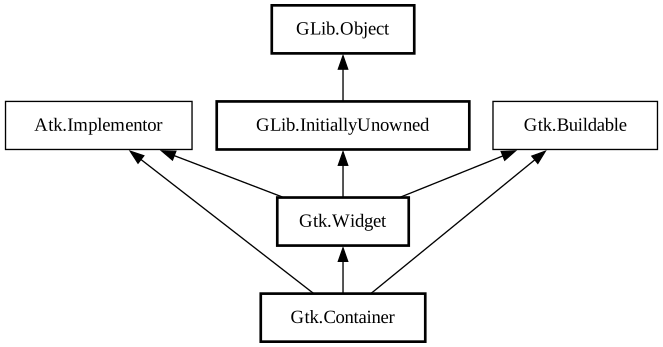
A GTK+ user interface is constructed by nesting widgets inside widgets.
Container widgets are the inner nodes in the resulting tree of widgets: they contain other widgets. So, for example, you might have a
Window containing a Frame containing a
Label. If you wanted an image instead of a textual label inside the frame, you might replace
the Label widget with a Image widget.
There are two major kinds of container widgets in GTK+. Both are subclasses of the abstract GtkContainer base class.
The first type of container widget has a single child widget and derives from Bin.
These containers are decorators, which add some kind of functionality to the child. For example, a
Button makes its child into a clickable button; a Frame
draws a frame around its child and a Window places its child widget inside a top-level
window.
The second type of container can have more than one child; its purpose is to manage layout. This means that these containers assign sizes
and positions to their children. For example, a HBox arranges its children in a horizontal row,
and a Grid arranges the widgets it contains in a two-dimensional grid.
For implementations of Container the virtual method GtkContainerClass.forall is always
required, since it's used for drawing and other internal operations on the children. If the Container
implementation expect to have non internal children it's needed to implement both add
and remove. If the GtkContainer implementation has internal children, they should
be added with set_parent on init and removed with
unparent in the destroy
implementation. See more about implementing custom widgets at https://wiki.gnome.org/HowDoI/CustomWidgets
Height for width geometry management
GTK+ uses a height-for-width (and width-for-height) geometry management system. Height-for-width means that a widget can change how much
vertical space it needs, depending on the amount of horizontal space that it is given (and similar for width-for-height).
There are some things to keep in mind when implementing container widgets that make use of GTK+’s height for width geometry management
system. First, it’s important to note that a container must prioritize one of its dimensions, that is to say that a widget or container
can only have a SizeRequestMode that is
gtk_size_request_height_for_width or gtk_size_request_width_for_height. However, every widget
and container must be able to respond to the APIs for both dimensions, i.e. even if a widget has a request mode that is height-for-width,
it is possible that its parent will request its sizes using the width-for-height APIs.
To ensure that everything works properly, here are some guidelines to follow when implementing height-for-width (or width-for-height)
containers.
Each request mode involves 2 virtual methods. Height-for-width apis run through
get_preferred_width and then through
get_preferred_height_for_width. When handling requests
in the opposite SizeRequestMode it is important that every widget request at least
enough space to display all of its content at all times.
When get_preferred_height is called on a container that is
height-for-width, the container must return the height for its minimum width. This is easily achieved by simply calling the reverse apis
implemented for itself as follows:
static void
foo_container_get_preferred_height (GtkWidget *widget,
                                    gint *min_height,
                                    gint *nat_height)
{
   if (i_am_in_height_for_width_mode)
     {
       gint min_width;

       GTK_WIDGET_GET_CLASS (widget)->get_preferred_width (widget,
                                                           &min_width,
                                                           NULL);
       GTK_WIDGET_GET_CLASS (widget)->get_preferred_height_for_width
                                                          (widget,
                                                           min_width,
                                                           min_height,
                                                           nat_height);
     }
   else
     {
       ... many containers support both request modes, execute the
       real width-for-height request here by returning the
       collective heights of all widgets that are stacked
       vertically (or whatever is appropriate for this container)
       ...
     }
}
Similarly, when get_preferred_width_for_height is
called for a container or widget that is height-for-width, it then only needs to return the base minimum width like so:
static void
foo_container_get_preferred_width_for_height (GtkWidget *widget,
                                              gint for_height,
                                              gint *min_width,
                                              gint *nat_width)
{
   if (i_am_in_height_for_width_mode)
     {
       GTK_WIDGET_GET_CLASS (widget)->get_preferred_width (widget,
                                                           min_width,
                                                           nat_width);
     }
   else
     {
       ... execute the real width-for-height request here based on
       the required width of the children collectively if the
       container were to be allocated the said height ...
     }
}
Height for width requests are generally implemented in terms of a virtual allocation of widgets in the input orientation. Assuming an
height-for-width request mode, a container would implement the get_preferred_height_for_width virtual function by first
calling get_preferred_width for each of its children.
For each potential group of children that are lined up horizontally, the values returned by
get_preferred_width should be collected in an array of
RequestedSize structures. Any child spacing should be removed from the input
for_width and then the collective size should be allocated using the
distribute_natural_allocation convenience function.
The container will then move on to request the preferred height for each child by using
get_preferred_height_for_width and using the sizes
stored in the RequestedSize array.
To allocate a height-for-width container, it’s again important to consider that a container must prioritize one dimension over the
other. So if a container is a height-for-width container it must first allocate all widgets horizontally using a
RequestedSize array and
distribute_natural_allocation and then add any extra space (if and
where appropriate) for the widget to expand.
After adding all the expand space, the container assumes it was allocated sufficient height to fit all of its content. At this time, the
container must use the total horizontal sizes of each widget to request the height-for-width of each of its children and store the
requests in a RequestedSize array for any widgets that stack vertically (for tabular
containers this can be generalized into the heights and widths of rows and columns). The vertical space must then again be distributed
using distribute_natural_allocation while this time considering the
allocated height of the widget minus any vertical spacing that the container adds. Then vertical expand space should be added where
appropriate and available and the container should go on to actually allocating the child widgets.
See GtkWidget’s geometry management section to learn more about implementing
height-for-width geometry management for widgets.
Child properties
GtkContainer introduces child properties. These are object properties that are not specific to either the container or the contained
widget, but rather to their relation. Typical examples of child properties are the position or pack-type of a widget which is contained in
a Box.
Use install_child_property to install child properties for a
container class and find_child_property or
list_child_properties to get information about existing child
properties.
To set the value of a child property, use child_set_property,
child_set or
child_set_valist. To obtain the value of a child property, use
child_get_property, child_get or
child_get_valist. To emit notification about child property changes, use
child_notify.
GtkContainer as GtkBuildable
The GtkContainer implementation of the GtkBuildable interface supports a `<packing>` element for children, which can contain
multiple `<property>` elements that specify child properties for the child.
Since 2.16, child properties can also be marked as translatable using the same “translatable”, “comments” and “context”
attributes that are used for regular properties.
Since 3.16, containers can have a `<focus-chain>` element containing multiple `<widget>` elements, one for each child that
should be added to the focus chain. The ”name” attribute gives the id of the widget.
An example of these properties in UI definitions:
<object class="GtkBox">
  <child>
    <object class="GtkEntry" id="entry1"/>
    <packing>
      <property name="pack-type">start</property>
    </packing>
  </child>
  <child>
    <object class="GtkEntry" id="entry2"/>
  </child>
  <focus-chain>
    <widget name="entry1"/>
    <widget name="entry2"/>
  </focus-chain>
</object>
- public void @foreach (Callback callback)
Invokes callback on each non-internal child of
this.
- public void add_with_properties (Widget widget, ...)
Adds widget to this,
setting child properties at the same time.
- public void child_get (Widget child, ...)
Gets the values of one or more child properties for child
and this.
- public void child_get_property (Widget child, string property_name, ref Value value)
Gets the value of a child property for child and
this.
- public void child_get_valist (Widget child, string first_property_name, va_list var_args)
Gets the values of one or more child properties for child
and this.
- public void child_notify (Widget child, string child_property)
Emits a
child_notify signal for the child property child_property on the child.
- public void child_notify_by_pspec (Widget child, ParamSpec pspec)
Emits a
child_notify signal for the child property specified by pspec on the child.
- public void child_set (Widget child, ...)
Sets one or more child properties for child and
this.
- public void child_set_property (Widget child, string property_name, Value value)
Sets a child property for child and
this.
- public void child_set_valist (Widget child, string first_property_name, va_list var_args)
Sets one or more child properties for child and
this.
- public virtual Type child_type ()
Returns the type of the children supported by the container.
- public class unowned ParamSpec? class_find_child_property (string property_name)
- public class (unowned ParamSpec)[] class_list_child_properties ()
- public virtual string composite_name (Widget child)
Gets a widget’s composite name.
- public class unowned ParamSpec? find_child_property (string property_name)
Finds a child property of a container class by name.
- public void forall (Callback callback)
Invokes callback on each direct child of
this, including children that are considered “internal” (implementation details of the container
).
- public virtual void forall_internal (bool include_internal, Callback callback)
- public uint get_border_width ()
Retrieves the border width of the container.
- public virtual void get_child_property (Widget child, uint property_id, ref Value value, ParamSpec pspec)
Get a property from a child of container.
- public List<unowned Widget> get_children ()
Returns the container’s non-internal children.
- public bool get_focus_chain (out List<unowned Widget> focusable_widgets)
Retrieves the focus chain of the container, if one has been set
explicitly.
- public unowned Widget? get_focus_child ()
Returns the current focus child widget inside
this.
- public unowned Adjustment? get_focus_hadjustment ()
Retrieves the horizontal focus adjustment for the container.
- public unowned Adjustment? get_focus_vadjustment ()
Retrieves the vertical focus adjustment for the container.
- public virtual WidgetPath get_path_for_child (Widget child)
Returns a newly created widget path representing all the widget
hierarchy from the toplevel down to and including child.
- public ResizeMode get_resize_mode ()
Returns the resize mode for the container.
- public class void handle_border_width ()
Modifies a subclass of Container
to automatically add and remove the border-width setting on GtkContainer.
- public class void install_child_properties (ParamSpec[] pspecs)
Installs child properties on a container class.
- public class void install_child_property (uint property_id, ParamSpec pspec)
Installs a child property on a container class.
- public class (unowned ParamSpec)[] list_child_properties ()
Returns all child properties of a container class.
- public void propagate_draw (Widget child, Context cr)
When a container receives a call to the draw function, it must send
synthetic draw calls to all children that don’t have their own
Windows.
- public void resize_children ()
- public void set_border_width (uint border_width)
Sets the border width of the container.
- public virtual void set_child_property (Widget child, uint property_id, Value value, ParamSpec pspec)
Set a property on a child of container.
- public void set_focus_chain (List<Widget> focusable_widgets)
Sets a focus chain, overriding the one computed automatically by GTK+.
- public void set_focus_hadjustment (Adjustment adjustment)
Hooks up an adjustment to focus handling in a container, so when a
child of the container is focused, the adjustment is scrolled to show that widget.
- public void set_focus_vadjustment (Adjustment adjustment)
Hooks up an adjustment to focus handling in a container, so when a
child of the container is focused, the adjustment is scrolled to show that widget.
- public void set_reallocate_redraws (bool needs_redraws)
Sets the reallocate_redraws flag of the container to the
given value.
- public void set_resize_mode (ResizeMode resize_mode)
Sets the resize mode for the container.
- public void unset_focus_chain ()