[ CCode ( type_id = "gtk_grid_get_type ()" ) ]
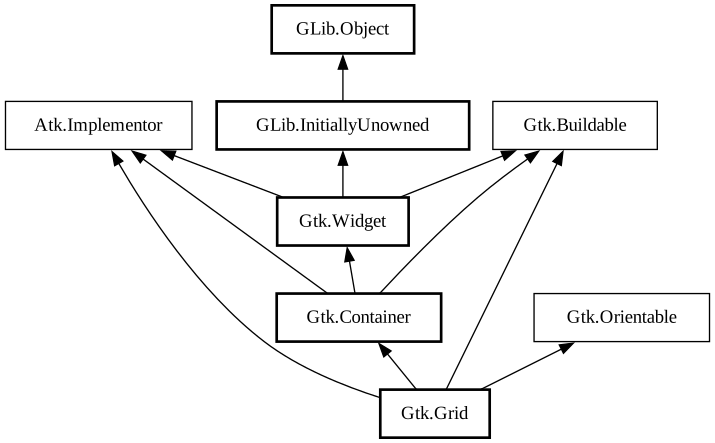
public class Grid : Container, Implementor, Buildable, Orientable
Grid
Object Hierarchy:
Description:
Arranges its child widgets in rows and columns.
<picture> <source srcset="grid-dark.png" media="(prefers-color-scheme: dark)"> <img alt="An example GtkGrid" src="grid.png"> </picture>
It supports arbitrary positions and horizontal/vertical spans.
Children are added using [method@Gtk.Grid.attach]. They can span multiple rows or columns. It is also possible to add a child next to an existing child, using [method@Gtk.Grid.attach_next_to]. To remove a child from the grid, use [method@Gtk.Grid.remove].
The behaviour of `GtkGrid` when several children occupy the same grid cell is undefined.
GtkGrid as GtkBuildable
Every child in a `GtkGrid` has access to a custom [iface@Gtk.Buildable] element, called `<layout>`. It can by used to specify a position in the grid and optionally spans. All properties that can be used in the `<layout>` element are implemented by [ class@Gtk.GridLayoutChild].
It is implemented by `GtkWidget` using [class@Gtk.LayoutManager].
To showcase it, here is a simple example:
```xml <object class="GtkGrid" id="my_grid"> <child> <object class="GtkButton" id="button1"> <property name="label">Button 1</property> <layout> <property name="column">0</property> <property name="row">0 </property> </layout> </object> </child> <child> <object class="GtkButton" id="button2"> < property name="label">Button 2</property> <layout> <property name="column">1</property> <property name="row">0</property> </layout> </object> </child> <child> <object class="GtkButton" id="button3"> <property name="label">Button 3</property> <layout> <property name="column">2</property> <property name="row">0</property> <property name="row-span">2</property> </layout> </object> </child> <child> <object class="GtkButton" id="button4"> <property name="label">Button 4</property> < layout> <property name="column">0</property> <property name="row">1</property> <property name="column-span">2</property> </layout> </object> </child> </object> ```
It organizes the first two buttons side-by-side in one cell each. The third button is in the last column but spans across two rows. This is defined by the `row-span` property. The last button is located in the second row and spans across two columns, which is defined by the `column-span` property.
CSS nodes
`GtkGrid` uses a single CSS node with name `grid`.
Accessibility
Until GTK 4.10, `GtkGrid` used the [enum@Gtk.AccessibleRole.group] role.
Starting from GTK 4.12, `GtkGrid` uses the [enum@Gtk.AccessibleRole.generic] role.
Namespace: Gtk
Package: gtk+-3.0
Content:
Properties:
Creation methods:
Methods:
Inherited Members:
All known members inherited from class Gtk.Container
All known members inherited from class Gtk.Widget
All known members inherited from class GLib.Object
All known members inherited from interface Atk.Implementor
All known members inherited from interface Gtk.Buildable
All known members inherited from interface Gtk.Orientable