[ CCode ( type_id = "adw_window_get_type ()" ) ]
public class Window : Window, Accessible, Buildable, ConstraintTarget, Native, Root, ShortcutManager
Window
Object Hierarchy:
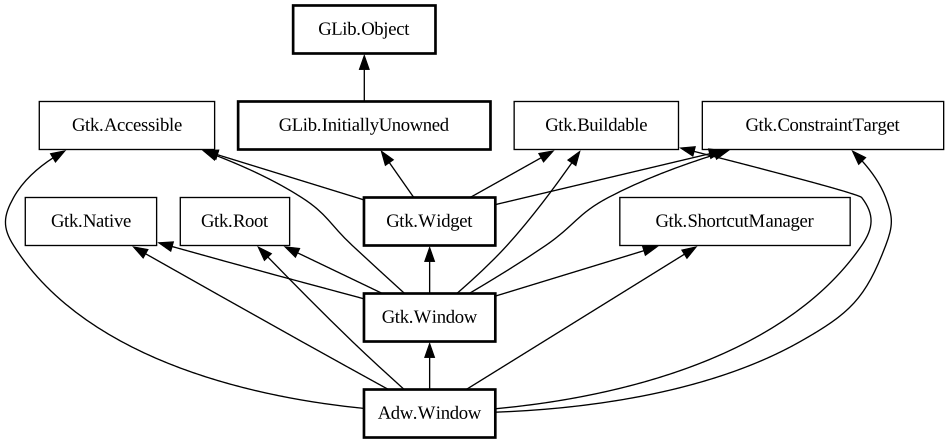
Description:
A freeform window.
<picture> <source srcset="window-dark.png" media="(prefers-color-scheme: dark)"> <img src="window.png" alt="window"> </picture>
The `AdwWindow` widget is a subclass of [class@Gtk.Window] which has no titlebar area. Instead, [class@ToolbarView] can be used together with [class@HeaderBar] or [class@Gtk.HeaderBar] as follows:
```xml <object class="AdwWindow"> <property name="content"> <object class="AdwToolbarView"> <child type="top"> <object class="AdwHeaderBar"/> </child> <property name="content"> <!-- put your content here --> < /property> </object> </property> </object> ```
Using [property@Gtk.Window:titlebar] or [property@Gtk.Window:child] is not supported and will result in a crash. Use [ property@Window:content] instead.
Dialogs
`AdwWindow` can contain [class@Dialog]. Use [method@Dialog.present] with the window or a widget within a window to show a dialog.
Breakpoints
`AdwWindow` can be used with [class@Breakpoint] the same way as [class@BreakpointBin]. Refer to that widget's documentation for details.
Example:
```xml <object class="AdwWindow"> <property name="content"> <object class="AdwToolbarView"> <child type="top"> <object class="AdwHeaderBar"/> </child> <property name="content"> <!-- put your content here --> < /property> <child type="bottom"> <object class="GtkActionBar" id="bottom_bar"> <property name="revealed">True< /property> <property name="visible">False</property> </object> </child> </object> </property> <child> <object class="AdwBreakpoint"> <condition>max-width: 500px</condition> <setter object="bottom_bar" property="visible">True</setter> </object> </child> </object> ```
When breakpoints are used, the minimum size must be larger than the smallest UI state. `AdwWindow` defaults to the minimum size of 360×200 px. If that's too small, set the [property@Gtk.Widget:width-request] and [property@Gtk.Widget:height-request] properties manually.
Adaptive Preview
`AdwWindow` has a debug tool called adaptive preview. It can be opened from GTK Inspector or by pressing <kbd>Ctrl</kbd>+< kbd>Shift</kbd>+<kbd>M</kbd>, and controlled via the [property@Window:adaptive-preview] property.
All known sub-classes:
Namespace: Adw
Package: libadwaita-1
Content:
Properties:
Creation methods:
Methods:
Inherited Members:
All known members inherited from class Gtk.Window
All known members inherited from class Gtk.Widget
All known members inherited from class GLib.Object
All known members inherited from interface Gtk.Accessible
All known members inherited from interface Gtk.Buildable
All known members inherited from interface Gtk.Native
All known members inherited from interface Gtk.Root
All known members inherited from interface Gtk.ShortcutManager