[ CCode ( type_id = "adw_dialog_get_type ()" ) ]
[ Version ( since = "1.5" ) ]
public class Dialog : Widget, Accessible, Buildable, ConstraintTarget, ShortcutManager
Dialog
Object Hierarchy:
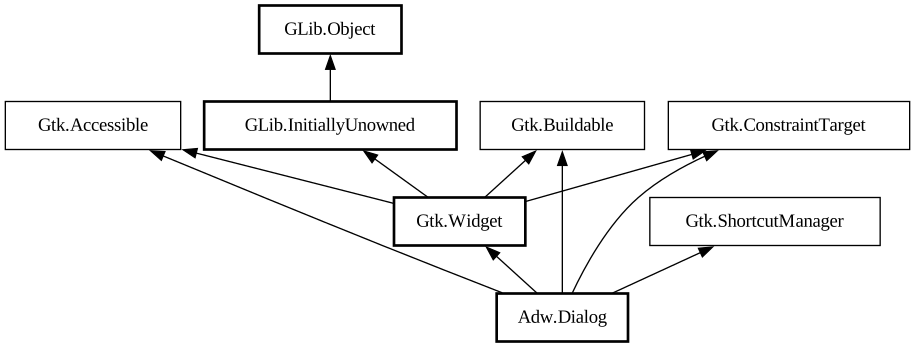
Description:
An adaptive dialog container.
<picture> <source srcset="dialog-floating-dark.png" media="(prefers-color-scheme: dark)"> <img src="dialog-floating.png" alt="dialog-floating"> </picture> <picture> <source srcset="dialog-bottom-dark.png" media="(prefers-color-scheme: dark )"> <img src="dialog-bottom.png" alt="dialog-bottom"> </picture>
`AdwDialog` is similar to a window, but is shown within another window. It can be used with [class@Window] and [class@ApplicationWindow], use [method@Dialog.present] to show it.
`AdwDialog` is not resizable. Use the [property@Dialog:content-width] and [property@Dialog:content-height] properties to set its size, or set [property@Dialog:follows-content-size] to `TRUE` to make the dialog track the content's size as it changes. `AdwDialog` can never be larger than its parent window.
`AdwDialog` can be presented as a centered floating window or a bottom sheet. By default it's automatic depending on the available size. [property@Dialog:presentation-mode] can be used to change that.
`AdwDialog` can be closed via [method@Dialog.close].
When presented as a bottom sheet, `AdwDialog` can also be closed via swiping it down.
The [property@Dialog:can-close] can be used to prevent closing. In that case, [signal@Dialog:AdwDialog:close-attempt] gets
emitted instead.
Use [method@Dialog.force_close] to close the dialog even when `can-close` is set to `FALSE`.
`AdwDialog` is transient and doesn't integrate with the window below it, for example it's not possible to collapse it into a bottom bar. See [class@BottomSheet] for persistent and more tightly integrated bottom sheets.
Header Bar Integration
When placed inside an `AdwDialog`, [class@HeaderBar] will display the dialog title instead of window title. It will also adjust the decoration layout to ensure it always has a close button and nothing else. Set [property@HeaderBar:show-start-title-buttons] and [ property@HeaderBar:show-end-title-buttons] to `FALSE` to remove it if it's unwanted.
Breakpoints
`AdwDialog` can be used with [class@Breakpoint] the same way as [class@BreakpointBin]. Refer to that widget's documentation for details.
Like `AdwBreakpointBin`, if breakpoints are used, `AdwDialog` doesn't have a minimum size, and [property@Gtk.Widget:width-request] and [ property@Gtk.Widget:height-request] properties must be set manually.
All known sub-classes:
Namespace: Adw
Package: libadwaita-1
Content:
Properties:
Creation methods:
Methods:
Signals:
Inherited Members:
All known members inherited from class Gtk.Widget
All known members inherited from class GLib.Object
All known members inherited from interface Gtk.Accessible
All known members inherited from interface Gtk.Buildable
All known members inherited from interface Gtk.ShortcutManager