[ CCode ( type_id = "gtk_window_get_type ()" ) ]
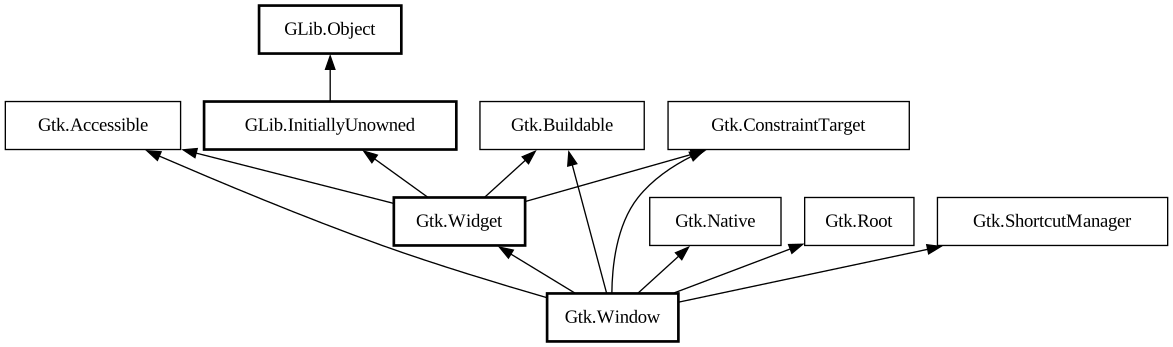
public class Window : Widget, Accessible, Buildable, ConstraintTarget, Native, Root, ShortcutManager
Window
Object Hierarchy:
Description:
A toplevel window which can contain other widgets.
<picture> <source srcset="window-dark.png" media="(prefers-color-scheme: dark)"> <img alt="An example GtkWindow" src="window.png"> </picture>
Windows normally have decorations that are under the control of the windowing system and allow the user to manipulate the window (resize it, move it, close it,...).
GtkWindow as GtkBuildable
The `GtkWindow` implementation of the [iface@Gtk.Buildable] interface supports setting a child as the titlebar by specifying “titlebar” as the “type” attribute of a `<child>` element.
Shortcuts and Gestures
`GtkWindow` supports the following keyboard shortcuts:
- <kbd>F10</kbd> activates the menubar, if present.
- <kbd>Alt</kbd> makes the mnemonics visible while pressed.
The following signals have default keybindings:
- [signal@Gtk.Window:
GtkWindow:activate-default] - [signal@Gtk.Window:
GtkWindow:activate-focuss] - [signal@Gtk.Window:
GtkWindow:enable-debugging]
Actions
`GtkWindow` defines a set of built-in actions:
- `default.activate` activates the default widget.
- `window.minimize` minimizes the window.
- `window.toggle-maximized` maximizes or restores the window.
- `window.close` closes the window.
CSS nodes
``` window.background [.csd / .solid-csd / .ssd] [.maximized / .fullscreen / .tiled] ├── <child> ╰── <titlebar child >.titlebar [.default-decoration] ```
`GtkWindow` has a main CSS node with name window and style class .background.
Style classes that are typically used with the main CSS node are .csd (when client-side decorations are in use), .solid-csd (for client-side decorations without invisible borders), .ssd (used by mutter when rendering server-side decorations). GtkWindow also represents window states with the following style classes on the main node: .maximized, .fullscreen, .tiled (when supported, also .tiled-top, .tiled-left, .tiled-right, .tiled-bottom).
`GtkWindow` subclasses often add their own discriminating style classes, such as .dialog, .popup or .tooltip.
Generally, some CSS properties don't make sense on the toplevel window node, such as margins or padding. When client-side decorations without invisible borders are in use (i.e. the .solid-csd style class is added to the main window node), the CSS border of the toplevel window is used for resize drags. In the .csd case, the shadow area outside of the window can be used to resize it.
`GtkWindow` adds the .titlebar and .default-decoration style classes to the widget that is added as a titlebar child.
Accessibility
`GtkWindow` uses the [enum@Gtk.AccessibleRole.window] role.
From GTK 4.12 to 4.18, it used the [enum@Gtk.AccessibleRole.application] role.
All known sub-classes:
Namespace: Gtk
Package: gtk4
Content:
Properties:
Static methods:
Creation methods:
Methods:
Signals:
Inherited Members:
All known members inherited from class Gtk.Widget
All known members inherited from class GLib.Object
All known members inherited from interface Gtk.Accessible
All known members inherited from interface Gtk.Buildable
All known members inherited from interface Gtk.Native
All known members inherited from interface Gtk.Root
All known members inherited from interface Gtk.ShortcutManager