[ CCode ( type_id = "adw_alert_dialog_get_type ()" ) ]
[ Version ( since = "1.5" ) ]
public class AlertDialog : Dialog, Accessible, Buildable, ConstraintTarget, ShortcutManager
AlertDialog
Object Hierarchy:
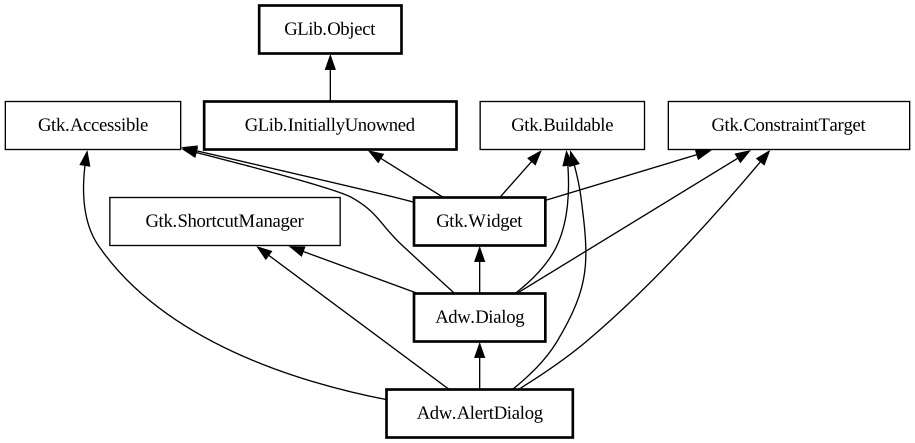
Description:
A dialog presenting a message or a question.
<picture> <source srcset="alert-dialog-dark.png" media="(prefers-color-scheme: dark)"> <img src="alert-dialog.png" alt="alert-dialog"> </picture>
Alert dialogs have a heading, a body, an optional child widget, and one or multiple responses, each presented as a button.
Each response has a unique string ID, and a button label. Additionally, each response can be enabled or disabled, and can have a suggested or destructive appearance.
When one of the responses is activated, or the dialog is closed, the [signal@AlertDialog:AdwAlertDialog:response] signal
will be emitted. This signal is detailed, and the detail, as well as the `response` parameter will be set to the ID of the activated
response, or to the value of the [property@AlertDialog:close-response] property if the dialog had been closed without activating any of
the responses.
Response buttons can be presented horizontally or vertically depending on available space.
When a response is activated, `AdwAlertDialog` is closed automatically.
An example of using an alert dialog:
```c AdwDialog *dialog;
dialog = adw_alert_dialog_new (_("Replace File?"), NULL);
adw_alert_dialog_format_body (ADW_ALERT_DIALOG (dialog), _("A file named “s” already exists. Do you want to replace it?"), filename);
adw_alert_dialog_add_responses (ADW_ALERT_DIALOG (dialog), "cancel", _("_Cancel"), "replace", _("_Replace"), NULL);
adw_alert_dialog_set_response_appearance (ADW_ALERT_DIALOG (dialog), "replace", ADW_RESPONSE_DESTRUCTIVE);
adw_alert_dialog_set_default_response (ADW_ALERT_DIALOG (dialog), "cancel"); adw_alert_dialog_set_close_response (ADW_ALERT_DIALOG ( dialog), "cancel");
g_signal_connect (dialog, "response", G_CALLBACK (response_cb), self);
adw_dialog_present (dialog, parent); ```
Async API
`AdwAlertDialog` can also be used via the [method@AlertDialog.choose] method. This API follows the GIO async pattern, for example:
```c static void dialog_cb (AdwAlertDialog *dialog, GAsyncResult *result, MyWindow *self) { const char *response = adw_alert_dialog_choose_finish (dialog, result);
// ... }
static void show_dialog (MyWindow *self) { AdwDialog *dialog;
dialog = adw_alert_dialog_new (_("Replace File?"), NULL);
adw_alert_dialog_format_body (ADW_ALERT_DIALOG (dialog), _("A file named “s” already exists. Do you want to replace it?"), filename);
adw_alert_dialog_add_responses (ADW_ALERT_DIALOG (dialog), "cancel", _("_Cancel"), "replace", _("_Replace"), NULL);
adw_alert_dialog_set_response_appearance (ADW_ALERT_DIALOG (dialog), "replace", ADW_RESPONSE_DESTRUCTIVE);
adw_alert_dialog_set_default_response (ADW_ALERT_DIALOG (dialog), "cancel"); adw_alert_dialog_set_close_response (ADW_ALERT_DIALOG ( dialog), "cancel");
adw_alert_dialog_choose (ADW_ALERT_DIALOG (dialog), GTK_WIDGET (self), NULL, (GAsyncReadyCallback) dialog_cb, self); } ```
AdwAlertDialog as GtkBuildable
`AdwAlertDialog` supports adding responses in UI definitions by via the `<responses>` element that may contain multiple `< response>` elements, each representing a response.
Each of the `<response>` elements must have the `id` attribute specifying the response ID. The contents of the element are used as the response label.
Response labels can be translated with the usual `translatable`, `context` and `comments` attributes.
The `<response>` elements can also have `enabled` and/or `appearance` attributes. See [method@AlertDialog.set_response_enabled] and [method@AlertDialog.set_response_appearance] for details.
Example of an `AdwAlertDialog` UI definition:
```xml <object class="AdwAlertDialog" id="dialog"> <property name="heading" translatable="yes">Save Changes?</property > <property name="body" translatable="yes">Open documents contain unsaved changes. Changes which are not saved will be permanently lost.</property> <property name="default-response">save</property> <property name="close-response"> cancel</property> <signal name="response" handler="response_cb"/> <responses> <response id="cancel" translatable="yes">_Cancel</response> <response id="discard" translatable="yes" appearance="destructive">_Discard< /response> <response id="save" translatable="yes" appearance="suggested" enabled="false">_Save</response> </responses > </object> ```
Namespace: Adw
Package: libadwaita-1
Content:
Properties:
Creation methods:
Methods:
Signals:
Inherited Members:
All known members inherited from class Adw.Dialog
All known members inherited from class Gtk.Widget
All known members inherited from class GLib.Object
All known members inherited from interface Gtk.Accessible
All known members inherited from interface Gtk.Buildable
All known members inherited from interface Gtk.ShortcutManager