[ CCode ( type_id = "adw_shortcuts_dialog_get_type ()" ) ]
[ Version ( since = "1.8" ) ]
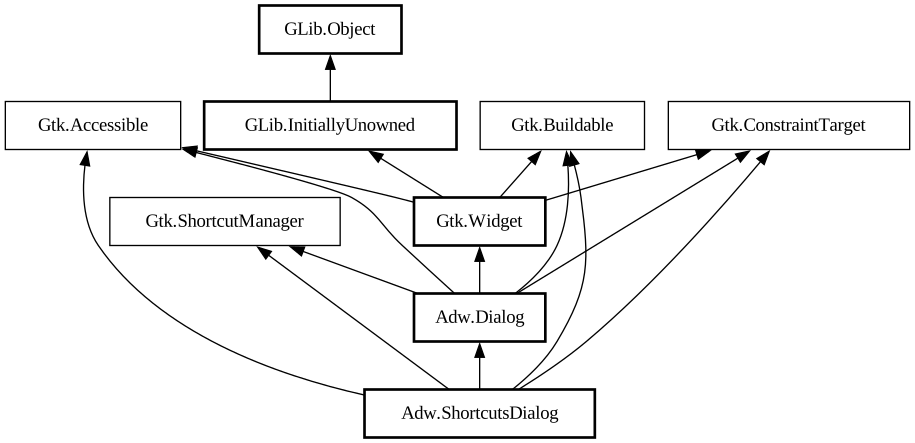
public sealed class ShortcutsDialog : Dialog, Accessible, Buildable, ConstraintTarget, ShortcutManager
ShortcutsDialog
Object Hierarchy:
Description:
A dialog that displays application's keyboard shortcuts.
<picture> <source srcset="shortcuts-dialog-dark.png" media="(prefers-color-scheme: dark)"> <img src="shortcuts-dialog.png" alt="shortcuts-dialog"> </picture>
Shortcuts are grouped into sections, represented by [class@ShortcutsSection] objects. Each section has one or more items, represented by [class@ShortcutsItem] objects.
To add a section to the dialog, use [method@ShortcutsDialog.add], or add it as a child when using UI files.
Sections without titles can be used to further subdivide each section into groups.
Example of an `AdwShortcutsDialog` UI definition:
```xml <object class="AdwShortcutsDialog" id="shortcuts_dialog"> <child> <object class="AdwShortcutsSection"> < property name="title" translatable="yes">General</property> <child> <object class="AdwShortcutsItem"> <property name="title" translatable="yes">Open Menu</property> <property name="accelerator">F10</property> </object> </child> <child> <object class="AdwShortcutsItem"> <property name="title" translatable="yes">Quit</property > <property name="action-name">app.quit</property> </object> </child> </object> </child> < child> <object class="AdwShortcutsSection"> <child> <object class="AdwShortcutsItem"> <property name="title" translatable="yes">Move Tab Left</property> <property name="accelerator"><Shift><Ctrl>Page_Up </property> <property name="direction">ltr</property> </object> </child> <child> <object class="AdwShortcutsItem"> <property name="title" translatable="yes">Move Tab Right</property> <property name="accelerator"><Shift><Ctrl>Page_Down</property> <property name="direction">ltr< /property> </object> </child> <child> <object class="AdwShortcutsItem"> <property name="title" translatable="yes">Move Tab Right</property> <property name="accelerator"><Shift><Ctrl>Page_Up </property> <property name="direction">rtl</property> </object> </child> <child> <object class="AdwShortcutsItem"> <property name="title" translatable="yes">Move Tab Left</property> <property name="accelerator"><Shift><Ctrl>Page_Down</property> <property name="direction">rtl< /property> </object> </child> </object> </child> </object> ```
If the `app.quit` action has the <kbd>Ctrl</kbd><kbd>Q</kbd> accelerator associated with it, the result will look as follows:
<picture> <source srcset="shortcuts-dialog-example-dark.png" media="(prefers-color-scheme: dark)"> <img src="shortcuts-dialog-example.png" alt="shortcuts-dialog-example"> </picture>
The recommended way to use `AdwShortcutsDialog` is via [class@Application]'s automatic resource loading.
See also: [class@ShortcutLabel].
Namespace: Adw
Package: libadwaita-1
Content:
Creation methods:
Methods:
Inherited Members:
All known members inherited from class Adw.Dialog
All known members inherited from class Gtk.Widget
All known members inherited from class GLib.Object
All known members inherited from interface Gtk.Accessible
All known members inherited from interface Gtk.Buildable
All known members inherited from interface Gtk.ShortcutManager