[ CCode ( type_id = "gimp_size_entry_get_type ()" ) ]
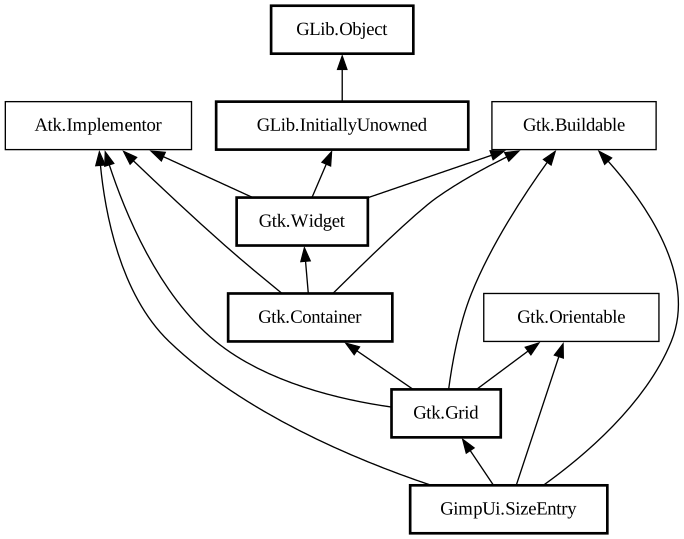
public class SizeEntry : Grid, Implementor, Buildable, Orientable
- SizeEntry
- SizeEntry
- add_field
- attach_label
- get_help_widget
- get_n_fields
- get_refval
- get_unit
- get_unit_combo
- get_update_policy
- get_value
- grab_focus
- set_activates_default
- set_pixel_digits
- set_refval
- set_refval_boundaries
- set_refval_digits
- set_resolution
- set_size
- set_unit
- set_value
- set_value_boundaries
- show_unit_menu
- refval_changed
- unit_changed
- value_changed
SizeEntry
Object Hierarchy:
Description:
This widget is used to enter pixel distances/sizes and resolutions.
You can specify the number of fields the widget should provide. For each field automatic mappings are performed between the field's "reference value" and its "value".
There is a UnitComboBox right of the entry fields which lets you specify the Unit of the displayed values.
For each field, there can be one or two SpinButton's to enter "value" and
"reference value". If you specify show_refval as false in
SizeEntry there will be only one
SpinButton and the
UnitComboBox will contain an item for selecting GIMP_UNIT_PIXEL.
The "reference value" is either of GIMP_UNIT_PIXEL or dpi, depending on which SizeEntryUpdatePolicy you specify in SizeEntry. The "value" is either the size in pixels mapped to the size in a real-world-unit (see Unit) or the dpi value mapped to pixels per real-world-unit.
Namespace: GimpUi
Package: gimp-ui-3.0
Content:
Creation methods:
- public SizeEntry (int number_of_fields, Unit unit, string unit_format, bool menu_show_pixels, bool menu_show_percent, bool show_refval, int spinbutton_width, SizeEntryUpdatePolicy update_policy)
Creates a new SizeEntry widget.
Methods:
- public void add_field (SpinButton value_spinbutton, SpinButton? refval_spinbutton)
Adds an input field to the SizeEntry.
- public unowned Widget attach_label (string text, int row, int column, float alignment)
- public unowned Widget get_help_widget (int field)
You shouldn't fiddle with the internals of a SizeEntry but if you want to set tooltips using help_set_help_data you can use this function to get a pointer to the spinbuttons.
- public int get_n_fields ()
- public double get_refval (int field)
Returns the reference value for field #
fieldof the SizeEntry. - public unowned Unit get_unit ()
Returns the Unit the user has selected in the SizeEntry's UnitComboBox .
- public unowned UnitComboBox get_unit_combo ()
- public SizeEntryUpdatePolicy get_update_policy ()
- public double get_value (int field)
Returns the value of field #
fieldof the SizeEntry. - public void grab_focus ()
This function is rather ugly and just a workaround for the fact that it's impossible to implement grab_focus for a Grid (is this actually true after the Table->Grid conversion?).
- public void set_activates_default (bool setting)
Iterates over all entries in the SizeEntry and calls set_activates_default on them.
- public void set_pixel_digits (int digits)
This function allows you set up a SizeEntry so that sub-pixel sizes can be entered.
- public void set_refval (int field, double refval)
Sets the reference value for field #
fieldof the SizeEntry. - public void set_refval_boundaries (int field, double lower, double upper)
Limits the range of possible reference values which can be entered in field #
fieldof the SizeEntry. - public void set_refval_digits (int field, int digits)
Sets the decimal digits of field #
fieldof the SizeEntry todigits. - public void set_resolution (int field, double resolution, bool keep_size)
Sets the resolution (in dpi) for field #
fieldof the SizeEntry. - public void set_size (int field, double lower, double upper)
Sets the pixel values for field #
fieldof the SizeEntry which will be treated as 0% and 100%. - public void set_unit (Unit unit)
Sets the SizeEntry's unit.
- public void set_value (int field, double value)
Sets the value for field #
fieldof the SizeEntry. - public void set_value_boundaries (int field, double lower, double upper)
Limits the range of possible values which can be entered in field #
fieldof the SizeEntry. - public void show_unit_menu (bool show)
Controls whether a unit menu is shown in the size entry.
Signals:
- public signal void refval_changed ()
- public signal void unit_changed ()
- public signal void value_changed ()
Inherited Members:
All known members inherited from class Gtk.Grid
All known members inherited from class Gtk.Container
All known members inherited from class Gtk.Widget
- accel_closures_changed
- activate
- add_accelerator
- add_device_events
- add_events
- add_mnemonic_label
- add_tick_callback
- adjust_baseline_allocation
- adjust_baseline_request
- adjust_size_allocation
- adjust_size_request
- app_paintable
- bind_template_callback_full
- bind_template_child_full
- button_press_event
- button_release_event
- can_activate_accel
- can_default
- can_focus
- child_focus
- child_notify
- class_path
- composite_child
- composited_changed
- compute_expand
- compute_expand_internal
- configure_event
- create_pango_context
- create_pango_layout
- damage_event
- delete_event
- destroy
- destroy_event
- destroyed
- device_is_shadowed
- direction_changed
- dispatch_child_properties_changed
- double_buffered
- drag_begin
- drag_data_delete
- drag_data_get
- drag_data_received
- drag_drop
- drag_end
- drag_failed
- drag_leave
- drag_motion
- draw
- draw_to_cairo_context
- ensure_style
- enter_notify_event
- error_bell
- event
- event_after
- events
- expand
- find_style_property
- focus
- focus_in_event
- focus_on_click
- focus_out_event
- freeze_child_notify
- get_accessible
- get_action_group
- get_allocated_baseline
- get_allocated_height
- get_allocated_size
- get_allocated_width
- get_allocation
- get_ancestor
- get_app_paintable
- get_can_default
- get_can_focus
- get_child_requisition
- get_child_visible
- get_clip
- get_clipboard
- get_composite_name
- get_css_name
- get_default_direction
- get_default_style
- get_device_enabled
- get_device_events
- get_direction
- get_display
- get_double_buffered
- get_events
- get_focus_on_click
- get_font_map
- get_font_options
- get_frame_clock
- get_halign
- get_has_tooltip
- get_has_window
- get_hexpand
- get_hexpand_set
- get_mapped
- get_margin_bottom
- get_margin_end
- get_margin_left
- get_margin_right
- get_margin_start
- get_margin_top
- get_modifier_mask
- get_modifier_style
- get_no_show_all
- get_opacity
- get_pango_context
- get_parent
- get_parent_window
- get_path
- get_pointer
- get_preferred_height
- get_preferred_height_and_baseline_for_width
- get_preferred_height_for_width
- get_preferred_height_for_width_internal
- get_preferred_height_internal
- get_preferred_size
- get_preferred_width
- get_preferred_width_for_height
- get_preferred_width_for_height_internal
- get_preferred_width_internal
- get_realized
- get_receives_default
- get_request_mode
- get_requisition
- get_root_window
- get_scale_factor
- get_screen
- get_sensitive
- get_settings
- get_size_request
- get_state
- get_state_flags
- get_style
- get_style_context
- get_support_multidevice
- get_template_child
- get_tooltip_markup
- get_tooltip_text
- get_tooltip_window
- get_toplevel
- get_valign
- get_valign_with_baseline
- get_vexpand
- get_vexpand_set
- get_visible
- get_visual
- get_window
- grab_broken_event
- grab_default
- grab_focus
- grab_notify
- halign
- has_default
- has_focus
- has_grab
- has_rc_style
- has_screen
- has_tooltip
- has_visible_focus
- height_request
- hexpand
- hexpand_set
- hide
- hide_on_delete
- hierarchy_changed
- in_destruction
- init_template
- input_shape_combine_region
- insert_action_group
- install_style_property
- install_style_property_parser
- intersect
- is_ancestor
- is_composited
- is_drawable
- is_focus
- is_sensitive
- is_toplevel
- is_visible
- key_press_event
- key_release_event
- keynav_failed
- leave_notify_event
- list_accel_closures
- list_action_prefixes
- list_mnemonic_labels
- list_style_properties
- map
- map_event
- margin
- margin_bottom
- margin_end
- margin_left
- margin_right
- margin_start
- margin_top
- mnemonic_activate
- modify_base
- modify_bg
- modify_cursor
- modify_fg
- modify_font
- modify_style
- modify_text
- motion_notify_event
- move_focus
- name
- no_show_all
- opacity
- override_background_color
- override_color
- override_cursor
- override_font
- override_symbolic_color
- parent
- parent_set
- path
- pop_composite_child
- popup_menu
- property_notify_event
- proximity_in_event
- proximity_out_event
- push_composite_child
- query_tooltip
- queue_allocate
- queue_compute_expand
- queue_draw
- queue_draw_area
- queue_draw_region
- queue_resize
- queue_resize_no_redraw
- realize
- receives_default
- region_intersect
- register_window
- remove_accelerator
- remove_mnemonic_label
- remove_tick_callback
- render_icon
- render_icon_pixbuf
- reparent
- reset_rc_styles
- reset_style
- scale_factor
- screen_changed
- scroll_event
- selection_clear_event
- selection_get
- selection_notify_event
- selection_received
- selection_request_event
- send_expose
- send_focus_change
- sensitive
- set_accel_path
- set_accessible_role
- set_accessible_type
- set_allocation
- set_app_paintable
- set_can_default
- set_can_focus
- set_child_visible
- set_clip
- set_composite_name
- set_connect_func
- set_css_name
- set_default_direction
- set_device_enabled
- set_device_events
- set_direction
- set_double_buffered
- set_events
- set_focus_on_click
- set_font_map
- set_font_options
- set_halign
- set_has_tooltip
- set_has_window
- set_hexpand
- set_hexpand_set
- set_mapped
- set_margin_bottom
- set_margin_end
- set_margin_left
- set_margin_right
- set_margin_start
- set_margin_top
- set_no_show_all
- set_opacity
- set_parent
- set_parent_window
- set_realized
- set_receives_default
- set_redraw_on_allocate
- set_sensitive
- set_size_request
- set_state
- set_state_flags
- set_style
- set_support_multidevice
- set_template
- set_template_from_resource
- set_tooltip_markup
- set_tooltip_text
- set_tooltip_window
- set_valign
- set_vexpand
- set_vexpand_set
- set_visible
- set_visual
- set_window
- shape_combine_region
- show
- show_all
- show_help
- show_now
- size_allocate
- size_allocate_with_baseline
- size_request
- state_changed
- state_flags_changed
- style
- style_attach
- style_get
- style_get_property
- style_get_valist
- style_set
- style_updated
- thaw_child_notify
- tooltip_markup
- tooltip_text
- touch_event
- translate_coordinates
- trigger_tooltip_query
- unmap
- unmap_event
- unparent
- unrealize
- unregister_window
- unset_state_flags
- valign
- vexpand
- vexpand_set
- visibility_notify_event
- visible
- width_request
- window_state_event
All known members inherited from class GLib.Object
All known members inherited from interface Atk.Implementor
All known members inherited from interface Gtk.Buildable
All known members inherited from interface Gtk.Orientable