[ CCode ( type_id = "adw_sidebar_section_get_type ()" ) ]
[ Version ( since = "1.9" ) ]
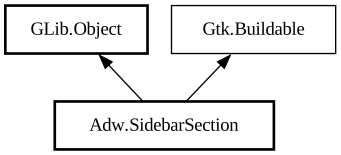
public sealed class SidebarSection : Object, Buildable
SidebarSection
Object Hierarchy:
Description:
A section within [class@Sidebar].
`AdwSidebarSection` contains [class@SidebarItem] objects.
Section can optionally have a title, set with the [property@SidebarSection:title] property. If a title is not set, the section will have a separator in front of it, or just spacing in the [enum@Adw.SidebarMode.page] mode.
Sections can also have an arbitrary suffix widget, set with the [property@SidebarSection:suffix] properties. It will be displayed at the end of its header.
To add items, use [method@SidebarSection.append], [method@SidebarSection.prepend] or [method@SidebarSection.insert].
To remove items, use [method@SidebarSection.remove] or [method@SidebarSection.remove_all].
To inspect the items, use [method@SidebarSection.get_item] or [property@SidebarSection:items].
To get the sidebar the section is in, use[property@SidebarSection:sidebar].
Binding models
`AdwSidebarSection` can show items from a provided [iface@Gio.ListModel], using [method@SidebarSection.bind_model]. It works the same way as [method@Gtk.ListBox.bind_model], except the provided function creates an [class@SidebarItem] rather than a [class@Gtk.ListBoxRow].
While a model is bound, adding or removing items manually is not allowed. Inspecting them is still allowed, but discouraged.
`AdwSidebarSection` as `GtkBuildable`
`AdwSidebarSection` allows adding items as children.
Example of an `AdwSidebarSection` UI definition:
```xml <object class="AdwSidebarSection"> <property name="title" translatable="yes">Places</property> <child> <object class="AdwSidebarItem"> <property name="title" translatable="yes">Music</property> <property name="icon-name">folder-music-symbolic</property> </object> </child> <child> <object class="AdwSidebarItem"> <property name="title" translatable="yes">Pictures</property> <property name="icon-name"> folder-pictures-symbolic</property> </object> </child> <child> <object class="AdwSidebarItem"> < property name="title" translatable="yes">Videos</property> <property name="icon-name">folder-videos-symbolic</property > </object> </child> </object> ```
Result:
<picture> <source srcset="sidebar-section-dark.png" media="(prefers-color-scheme: dark)"> <img src="sidebar-section.png" alt="sidebar-section"> </picture>
Namespace: Adw
Package: libadwaita-1
Content:
Properties:
Creation methods:
Methods:
Inherited Members:
All known members inherited from class GLib.Object
All known members inherited from interface Gtk.Buildable