[ CCode ( cname = "GstPlay" , lower_case_cprefix = "gst_play_" , type_id = "gst_play_get_type ()" ) ]
[ GIR ( name = "Play" ) ]
[ Version ( since = "1.20" ) ]
public class Play : Object
Play
Object Hierarchy:
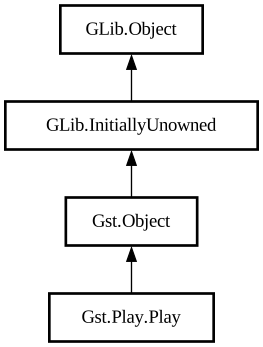
Description:
The goal of the GstPlay library is to ease the integration of multimedia playback features in applications.
Thus, if you need to build a media player from the ground-up, GstPlay provides the features you will most likely need.
An example player is available in gst-examples/playback/player/gst-play/.
Internally the GstPlay makes use of the `playbin3` element. The legacy `playbin2` can be selected if the `GST_PLAY_USE_PLAYBIN3=0` environment variable has been set.
**Important note**: If your application relies on the GstBus to get notifications from GstPlay, you need to add some explicit clean-up code in order to prevent the GstPlay object from leaking. See below for the details. If you use the GstPlaySignalAdapter, no special clean-up is required.
When the GstPlaySignalAdapter is not used, the GstBus owned by GstPlay should be set to flushing state before any attempt to drop the last reference of the GstPlay object. An example in C:
```c ... GstBus *bus = gst_play_get_message_bus (player); gst_bus_set_flushing (bus, TRUE); gst_object_unref (bus); gst_object_unref ( player); ```
The messages managed by the player contain a reference to itself, and if the bus watch is just removed together with dropping the player then the bus will simply keep them around forever (and the bus never goes away because the player has a strong reference to it, so there's a reference cycle as long as there are messages). Setting the bus to flushing state forces it to get rid of its queued messages, thus breaking any possible reference cycle.
Namespace: Gst.Play
Package: gstreamer-play-1.0
Content:
Properties:
Static methods:
Creation methods:
Methods:
Inherited Members:
All known members inherited from class Gst.Object
All known members inherited from class GLib.Object