[ CCode ( type_id = "phosh_quick_setting_get_type ()" ) ]
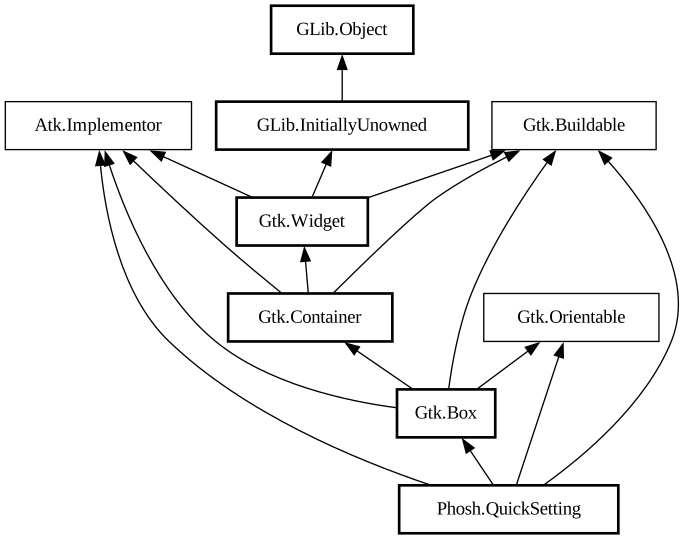
public class QuickSetting : Box, Implementor, Buildable, Orientable
QuickSetting
Object Hierarchy:
Description:
A `PhoshQuickSetting` represents a state of an entity (like Wi-Fi, Bluetooth) using an icon and label.
It should be added to a PhoshQuickSettingsBox for better integration.
A quick-setting displays the state using an icon and label. The state is set by [class@Phosh.StatusIcon], which must be set as a [ property@Phosh.QuickSetting:status-icon]. It can also have a status-page, which can be used to expose additional features. For example, a Wi-Fi quick-setting can show available Wi-Fi hotspots as an extra option. When a status widget is set, the quick-setting displays an arrow at the right end.
A quick-setting itself does not have any provision to display its status-page. It is completely upto the user to display and hide the
status-pages as required. However the quick-setting can aid in the task with its [property@Phosh.QuickSetting:showing-status] property.
When `showing-status` is false, clicking the arrow will cause the quick-setting to emit [signal@Phosh.QuickSetting:
PhoshQuickSetting:show-statuss]. If `showing-status` is true, then it will emit [signal@Phosh.QuickSetting:
PhoshQuickSetting:hide-statuss]. The user of the quick-setting is expected to follow this convention and set `showing-status`
based on whether they are displaying the status-page or not.
A quick-setting might be temporarily prevented from showing its status-page using [property@Phosh.QuickSetting:can-show-status]. Again, `PhoshQuickSettingsBox` can take care of this property, such that once you tell the box if showing status-page is allowed, it will ensure that the children's `can-show-status` are synchronized with it.
A quick-setting can be in an active or inactive state. However clicking the quick-setting does not toggle its state. The user must set the state using [property@Phosh.QuickSetting:active]. If the status-icon [class@StatusIcon] has an `enabled` property it will be automatically bound to the [property@Phosh.QuickSetting:active] property.
When a quick-setting is clicked, [signal@Phosh.QuickSetting:PhoshQuickSetting:clicked] is emitted. When it is long-pressed
or right-clicked, [signal@PhoshQuickSetting:PhoshQuickSetting:long-pressed] is emitted.
The common usecase of `long-pressed` is to launch an action (like `panel.launch-panel`). So to avoid duplicating this process for each quick-setting, the user can set [property@Phosh.QuickSetting:long-press-action-name] and [ property@Phosh.QuickSetting:long-press-action-target]. The quick-setting then launches that appropriate action.
Namespace: Phosh
Package: libphosh-0.45
Content:
Properties:
Creation methods:
Methods:
Signals:
Inherited Members:
All known members inherited from class Gtk.Box
All known members inherited from class Gtk.Container
All known members inherited from class Gtk.Widget
All known members inherited from class GLib.Object
All known members inherited from interface Atk.Implementor
All known members inherited from interface Gtk.Buildable
All known members inherited from interface Gtk.Orientable