[ CCode ( type_id = "adap_dialog_get_type ()" ) ]
[ Version ( since = "1.5" ) ]
public class Dialog : Widget, Accessible, Buildable, ConstraintTarget
Dialog
Object Hierarchy:
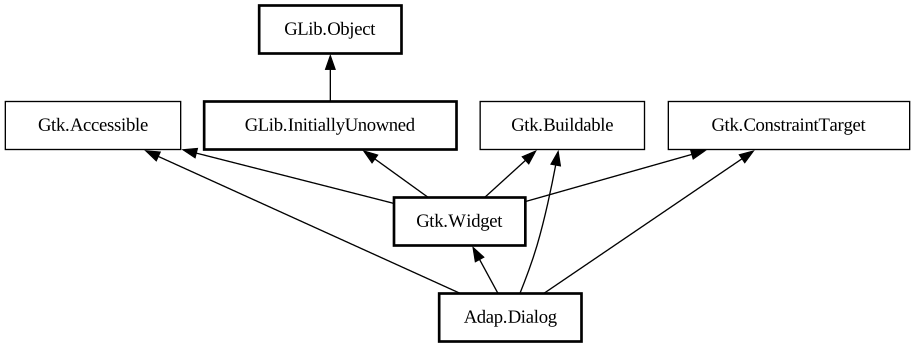
Description:
An adaptive dialog container.
<picture> <source srcset="dialog-floating-dark.png" media="(prefers-color-scheme: dark)"> <img src="dialog-floating.png" alt="dialog-floating"> </picture> <picture> <source srcset="dialog-bottom-dark.png" media="(prefers-color-scheme: dark )"> <img src="dialog-bottom.png" alt="dialog-bottom"> </picture>
`AdapDialog` is similar to a window, but is shown within another window. It can be used with [class@Window] and [class@ApplicationWindow] , use [method@Dialog.present] to show it.
`AdapDialog` is not resizable. Use the [property@Dialog:content-width] and [property@Dialog:content-height] properties to set its size, or set [property@Dialog:follows-content-size] to `TRUE` to make the dialog track the content's size as it changes. `AdapDialog` can never be larger than its parent window.
`AdapDialog` can be presented as a centered floating window or a bottom sheet. By default it's automatic depending on the available size. [property@Dialog:presentation-mode] can be used to change that.
`AdapDialog` can be closed via [method@Dialog.close].
When presented as a bottom sheet, `AdapDialog` can also be closed via swiping it down.
The [property@Dialog:can-close] can be used to prevent closing. In that case, [signal@Dialog:AdapDialog:close-attempt] gets
emitted instead.
Use [method@Dialog.force_close] to close the dialog even when `can-close` is set to `FALSE`.
Header Bar Integration
When placed inside an `AdapDialog`, [class@HeaderBar] will display the dialog title instead of window title. It will also adjust the decoration layout to ensure it always has a close button and nothing else. Set [property@HeaderBar:show-start-title-buttons] and [ property@HeaderBar:show-end-title-buttons] to `FALSE` to remove it if it's unwanted.
Breakpoints
`AdapDialog` can be used with [class@Breakpoint] the same way as [class@BreakpointBin]. Refer to that widget's documentation for details.
Like `AdapBreakpointBin`, if breakpoints are used, `AdapDialog` doesn't have a minimum size, and [property@Gtk.Widget:width-request] and [property@Gtk.Widget:height-request] properties must be set manually.
All known sub-classes:
Namespace: Adap
Package: libadapta-1
Content:
Properties:
Creation methods:
Methods:
Signals:
Inherited Members:
All known members inherited from class Gtk.Widget
All known members inherited from class GLib.Object
All known members inherited from interface Gtk.Accessible
All known members inherited from interface Gtk.Buildable