[ CCode ( type_id = "gtk_source_view_get_type ()" ) ]
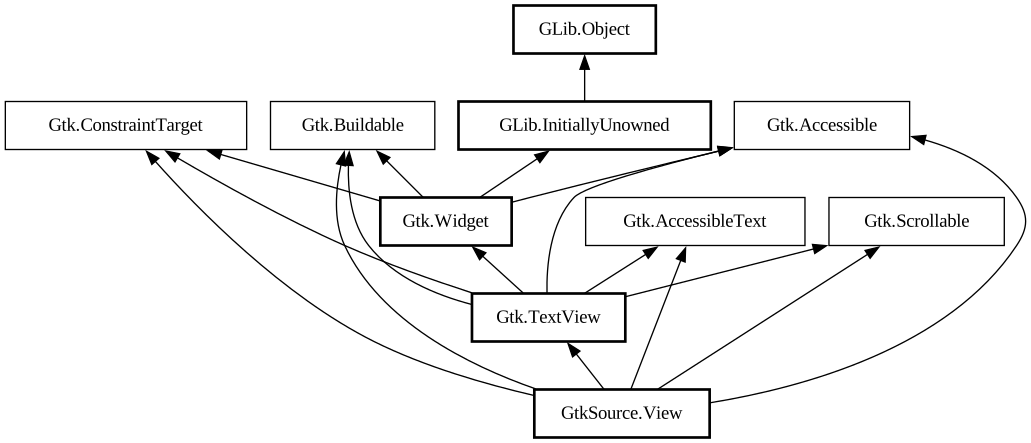
public class View : TextView, Accessible, AccessibleText, Buildable, ConstraintTarget, Scrollable
- View
- annotations
- auto_indent
- background_pattern
- completion
- enable_snippets
- highlight_current_line
- indent_on_tab
- indent_width
- indenter
- insert_spaces_instead_of_tabs
- right_margin_position
- show_line_marks
- show_line_numbers
- show_right_margin
- smart_backspace
- smart_home_end
- space_drawer
- tab_width
- View
- View.with_buffer
- get_annotations
- get_auto_indent
- get_background_pattern
- get_completion
- get_enable_snippets
- get_gutter
- get_highlight_current_line
- get_hover
- get_indent_on_tab
- get_indent_width
- get_indenter
- get_insert_spaces_instead_of_tabs
- get_mark_attributes
- get_right_margin_position
- get_show_line_marks
- get_show_line_numbers
- get_show_right_margin
- get_smart_backspace
- get_smart_home_end
- get_space_drawer
- get_tab_width
- get_visual_column
- indent_lines
- set_auto_indent
- set_background_pattern
- set_enable_snippets
- set_highlight_current_line
- set_indent_on_tab
- set_indent_width
- set_indenter
- set_insert_spaces_instead_of_tabs
- set_mark_attributes
- set_right_margin_position
- set_show_line_marks
- set_show_line_numbers
- set_show_right_margin
- set_smart_backspace
- set_smart_home_end
- set_tab_width
- unindent_lines
- change_case
- change_number
- join_lines
- line_mark_activated
- move_lines
- move_to_matching_bracket
- move_words
- push_snippet
- show_completion
View
Object Hierarchy:
Description:
Subclass of [class@Gtk.
TextView].
`GtkSourceView` is the main class of the GtkSourceView library. Use a [class@Buffer] to display text with a `GtkSourceView`.
This class provides:
- Show the line numbers;
- Show a right margin;
- Highlight the current line;
- Indentation settings;
- Configuration for the Home and End keyboard keys;
- Configure and show line marks;
- And a few other things.
An easy way to test all these features is to use the test-widget mini-program provided in the GtkSourceView repository, in the tests/ directory.
GtkSourceView as GtkBuildable
The GtkSourceView implementation of the [iface@Gtk.Buildable] interface exposes the [property@View:completion] object with the internal-child "completion".
An example of a UI definition fragment with GtkSourceView: ```xml <object class="GtkSourceView" id="source_view"> <property name="tab-width">4</property> <property name="auto-indent">True</property> <child internal-child="completion" > <object class="GtkSourceCompletion"> <property name="select-on-show">False</property> </object> < /child> </object> ```
Changing the Font
Gtk CSS provides the best way to change the font for a `GtkSourceView` in a manner that allows for components like [class@Map] to scale the desired font.
```c GtkCssProvider *provider = gtk_css_provider_new (); gtk_css_provider_load_from_string (provider, "textview { font-family: Monospace; font-size: 8pt; }"); gtk_style_context_add_provider (gtk_widget_get_style_context (view), GTK_STYLE_PROVIDER (provider), GTK_STYLE_PROVIDER_PRIORITY_APPLICATION); g_object_unref (provider); ``` ```python provider = Gtk.CssProvider() provider.load_from_string( "textview { font-family: Monospace; font-size: 8pt; }") style_context = view.get_style_context() style_context.add_provider(provider, Gtk.STYLE_PROVIDER_PRIORITY_APPLICATION) ```
If you need to adjust the font or size of font within a portion of the document only, you should use a [class@Gtk.TextTag] with the [ property@Gtk.TextTag:family] or [property@Gtk.TextTag:scale] set so that the font size may be scaled relative to the default font set in CSS.
All known sub-classes:
Namespace: GtkSource
Package: gtksourceview-5
Content:
Properties:
- public Annotations annotations { get; }
The [class@Annotations] object associated with the view.
- public bool auto_indent { get; set; }
Whether to enable auto indentation.
- public BackgroundPatternType background_pattern { get; set; }
Draw a specific background pattern on the view.
- public Completion completion { get; }
The completion object associated with the view
- public bool enable_snippets { get; set; }
The property denotes if snippets should be expanded when the user presses Tab after having typed a word matching the snippets found in [class@SnippetManager].
- public bool highlight_current_line { get; set; }
Whether to highlight the current line.
- public bool indent_on_tab { get; set; }
Whether to indent the selected text when the tab key is pressed.
- public int indent_width { get; set; }
Width of an indentation step expressed in number of spaces.
- public Indenter indenter { get; set; }
The property is a [iface@Indenter] to use to indent as the user types into the [class@View].
- public bool insert_spaces_instead_of_tabs { get; set; }
Whether to insert spaces instead of tabs.
- public uint right_margin_position { get; set; }
Position of the right margin.
- public bool show_line_marks { get; set; }
Whether to display line mark pixbufs
- public bool show_line_numbers { get; set; }
Whether to display line numbers
- public bool show_right_margin { get; set; }
Whether to display the right margin.
- public bool smart_backspace { get; set; }
Whether smart Backspace should be used.
- public SmartHomeEndType smart_home_end { get; set; }
Set the behavior of the HOME and END keys.
- public SpaceDrawer space_drawer { get; }
The [class@SpaceDrawer] object associated with the view.
- public uint tab_width { get; set; }
Width of a tab character expressed in number of spaces.
Creation methods:
- public View ()
Creates a new `GtkSourceView`.
- public View.with_buffer (Buffer buffer)
Creates a new View widget displaying the buffer
buffer.
Methods:
- public unowned Annotations get_annotations ()
Gets the [class@Annotations] associated with this.
- public bool get_auto_indent ()
Returns whether auto-indentation of text is enabled.
- public BackgroundPatternType get_background_pattern ()
Returns the BackgroundPatternType specifying if and how the background pattern should be displayed for this this.
- public unowned Completion get_completion ()
Gets the [class@Completion] associated with this.
- public bool get_enable_snippets ()
Gets the [property@View:enable-snippets] property.
- public unowned Gutter get_gutter (TextWindowType window_type)
Returns the [class@Gutter] object associated with
window_typefor this. - public bool get_highlight_current_line ()
Returns whether the current line is highlighted.
- public unowned Hover get_hover ()
Gets the [class@Hover] associated with this .
- public bool get_indent_on_tab ()
Returns whether when the tab key is pressed the current selection should get indented instead of replaced with the `\t` character.
- public int get_indent_width ()
Returns the number of spaces to use for each step of indent.
- public unowned Indenter? get_indenter ()
Gets the [property@View:indenter] property.
- public bool get_insert_spaces_instead_of_tabs ()
Returns whether when inserting a tabulator character it should be replaced by a group of space characters.
- public unowned MarkAttributes get_mark_attributes (string category, int priority)
Gets attributes and priority for the
category. - public uint get_right_margin_position ()
Gets the position of the right margin in the given this.
- public bool get_show_line_marks ()
Returns whether line marks are displayed beside the text.
- public bool get_show_line_numbers ()
Returns whether line numbers are displayed beside the text.
- public bool get_show_right_margin ()
Returns whether a right margin is displayed.
- public bool get_smart_backspace ()
Returns true if pressing the Backspace key will try to delete spaces up to the previous tab stop.
- public SmartHomeEndType get_smart_home_end ()
Returns a [enum@SmartHomeEndType] end value specifying how the cursor will move when HOME and END keys are pressed.
- public unowned SpaceDrawer get_space_drawer ()
Gets the [class@SpaceDrawer] associated with this.
- public uint get_tab_width ()
Returns the width of tabulation in characters.
- public uint get_visual_column (TextIter iter)
Determines the visual column at
itertaking into consideration the [property@View:tab-width] of this. - public void indent_lines (TextIter start, TextIter end)
Inserts one indentation level at the beginning of the specified lines.
- public void set_auto_indent (bool enable)
If true auto-indentation of text is enabled.
- public void set_background_pattern (BackgroundPatternType background_pattern)
Set if and how the background pattern should be displayed.
- public void set_enable_snippets (bool enable_snippets)
Sets the [property@View:enable-snippets] property.
- public void set_highlight_current_line (bool highlight)
If
highlightis true the current line will be highlighted. - public void set_indent_on_tab (bool enable)
If true, when the tab key is pressed when several lines are selected, the selected lines are indented of one level instead of being replaced with a `\t` character.
- public void set_indent_width (int width)
Sets the number of spaces to use for each step of indent when the tab key is pressed.
- public void set_indenter (Indenter? indenter)
Sets the indenter for this to
indenter. - public void set_insert_spaces_instead_of_tabs (bool enable)
If true a tab key pressed is replaced by a group of space characters.
- public void set_mark_attributes (string category, MarkAttributes attributes, int priority)
Sets attributes and priority for the
category. - public void set_right_margin_position (uint pos)
Sets the position of the right margin in the given this.
- public void set_show_line_marks (bool show)
If true line marks will be displayed beside the text.
- public void set_show_line_numbers (bool show)
If true line numbers will be displayed beside the text.
- public void set_show_right_margin (bool show)
If true a right margin is displayed.
- public void set_smart_backspace (bool smart_backspace)
When set to true, pressing the Backspace key will try to delete spaces up to the previous tab stop.
- public void set_smart_home_end (SmartHomeEndType smart_home_end)
Set the desired movement of the cursor when HOME and END keys are pressed.
- public void set_tab_width (uint width)
Sets the width of tabulation in characters.
- public void unindent_lines (TextIter start, TextIter end)
Removes one indentation level at the beginning of the specified lines.
Signals:
- public signal void change_case (ChangeCaseType case_type)
Keybinding signal to change case of the text at the current cursor position.
- public signal void change_number (int count)
Keybinding signal to edit a number at the current cursor position.
- public signal void join_lines ()
Keybinding signal to join the lines currently selected.
- public virtual signal void line_mark_activated (TextIter iter, uint button, ModifierType state, int n_presses)
Emitted when a line mark has been activated (for instance when there was a button press in the line marks gutter).
- public virtual signal void move_lines (bool down)
The signal is a keybinding which gets emitted when the user initiates moving a line.
- public signal void move_to_matching_bracket (bool extend_selection)
Keybinding signal to move the cursor to the matching bracket.
- public virtual signal void move_words (int step)
The signal is a keybinding which gets emitted when the user initiates moving a word.
- public virtual signal void push_snippet (Snippet snippet, ref TextIter location)
The signal is emitted to insert a new snippet into the view.
- public virtual signal void show_completion ()
The signal is a key binding signal which gets emitted when the user requests a completion, by pressing <keycombo><keycap>Control</keycap><keycap>space</keycap></keycombo >.
Inherited Members:
All known members inherited from class Gtk.TextView
- accepts_tab
- add_child_at_anchor
- add_overlay
- backspace
- backward_display_line
- backward_display_line_start
- bottom_margin
- buffer
- buffer_to_window_coords
- copy_clipboard
- create_buffer
- cursor_visible
- cut_clipboard
- delete_from_cursor
- editable
- extend_selection
- extra_menu
- forward_display_line
- forward_display_line_end
- get_accepts_tab
- get_bottom_margin
- get_buffer
- get_cursor_locations
- get_cursor_visible
- get_editable
- get_extra_menu
- get_gutter
- get_indent
- get_input_hints
- get_input_purpose
- get_iter_at_location
- get_iter_at_position
- get_iter_location
- get_justification
- get_left_margin
- get_line_at_y
- get_line_yrange
- get_ltr_context
- get_monospace
- get_overwrite
- get_pixels_above_lines
- get_pixels_below_lines
- get_pixels_inside_wrap
- get_right_margin
- get_rtl_context
- get_tabs
- get_top_margin
- get_visible_offset
- get_visible_rect
- get_wrap_mode
- im_context_filter_keypress
- im_module
- indent
- input_hints
- input_purpose
- insert_at_cursor
- insert_emoji
- justification
- left_margin
- monospace
- move_cursor
- move_mark_onscreen
- move_overlay
- move_viewport
- move_visually
- overwrite
- paste_clipboard
- pixels_above_lines
- pixels_below_lines
- pixels_inside_wrap
- place_cursor_onscreen
- preedit_changed
- remove
- reset_cursor_blink
- reset_im_context
- right_margin
- scroll_mark_onscreen
- scroll_to_iter
- scroll_to_mark
- select_all
- set_accepts_tab
- set_anchor
- set_bottom_margin
- set_buffer
- set_cursor_visible
- set_editable
- set_extra_menu
- set_gutter
- set_indent
- set_input_hints
- set_input_purpose
- set_justification
- set_left_margin
- set_monospace
- set_overwrite
- set_pixels_above_lines
- set_pixels_below_lines
- set_pixels_inside_wrap
- set_right_margin
- set_tabs
- set_top_margin
- set_wrap_mode
- snapshot_layer
- starts_display_line
- tabs
- toggle_cursor_visible
- toggle_overwrite
- top_margin
- window_to_buffer_coords
- wrap_mode
All known members inherited from class Gtk.Widget
- action_set_enabled
- activate
- activate_action
- activate_action_variant
- activate_default
- add_binding
- add_binding_action
- add_binding_signal
- add_controller
- add_css_class
- add_mnemonic_label
- add_shortcut
- add_tick_callback
- allocate
- allocate_size
- bind_template_callback_full
- bind_template_child_full
- can_focus
- can_target
- child_focus
- compute_bounds
- compute_expand
- compute_expand_internal
- compute_point
- compute_transform
- contains
- create_pango_context
- create_pango_layout
- css_changed
- css_classes
- css_name
- cursor
- destroy
- direction_changed
- dispose_template
- error_bell
- focus
- focus_on_click
- focusable
- get_accessible_role
- get_activate_signal
- get_allocated_baseline
- get_allocated_height
- get_allocated_width
- get_allocation
- get_ancestor
- get_baseline
- get_can_focus
- get_can_target
- get_child_visible
- get_clipboard
- get_color
- get_css_classes
- get_css_name
- get_cursor
- get_default_direction
- get_direction
- get_display
- get_first_child
- get_focus_child
- get_focus_on_click
- get_focusable
- get_font_map
- get_font_options
- get_frame_clock
- get_halign
- get_has_tooltip
- get_height
- get_hexpand
- get_hexpand_set
- get_last_child
- get_layout_manager
- get_layout_manager_type
- get_limit_events
- get_mapped
- get_margin_bottom
- get_margin_end
- get_margin_start
- get_margin_top
- get_name
- get_native
- get_next_sibling
- get_opacity
- get_overflow
- get_pango_context
- get_parent
- get_preferred_size
- get_prev_sibling
- get_primary_clipboard
- get_realized
- get_receives_default
- get_request_mode
- get_root
- get_scale_factor
- get_sensitive
- get_settings
- get_size
- get_size_request
- get_state_flags
- get_style_context
- get_template_child
- get_tooltip_markup
- get_tooltip_text
- get_valign
- get_vexpand
- get_vexpand_set
- get_visible
- get_width
- grab_focus
- halign
- has_css_class
- has_default
- has_focus
- has_tooltip
- has_visible_focus
- height_request
- hexpand
- hexpand_set
- hide
- in_destruction
- init_template
- insert_action_group
- insert_after
- insert_before
- install_action
- install_property_action
- is_ancestor
- is_drawable
- is_focus
- is_sensitive
- is_visible
- keynav_failed
- layout_manager
- limit_events
- list_mnemonic_labels
- map
- margin_bottom
- margin_end
- margin_start
- margin_top
- measure
- mnemonic_activate
- move_focus
- name
- observe_children
- observe_controllers
- opacity
- overflow
- parent
- pick
- query_action
- query_tooltip
- queue_allocate
- queue_draw
- queue_resize
- realize
- receives_default
- remove_controller
- remove_css_class
- remove_mnemonic_label
- remove_tick_callback
- root
- scale_factor
- sensitive
- set_accessible_role
- set_activate_signal
- set_activate_signal_from_name
- set_can_focus
- set_can_target
- set_child_visible
- set_css_classes
- set_css_name
- set_cursor
- set_cursor_from_name
- set_default_direction
- set_direction
- set_focus_child
- set_focus_on_click
- set_focusable
- set_font_map
- set_font_options
- set_halign
- set_has_tooltip
- set_hexpand
- set_hexpand_set
- set_layout_manager
- set_layout_manager_type
- set_limit_events
- set_margin_bottom
- set_margin_end
- set_margin_start
- set_margin_top
- set_name
- set_opacity
- set_overflow
- set_parent
- set_receives_default
- set_sensitive
- set_size_request
- set_state_flags
- set_template
- set_template_from_resource
- set_template_scope
- set_tooltip_markup
- set_tooltip_text
- set_valign
- set_vexpand
- set_vexpand_set
- set_visible
- should_layout
- show
- size_allocate
- snapshot
- snapshot_child
- state_flags_changed
- system_setting_changed
- tooltip_markup
- tooltip_text
- translate_coordinates
- trigger_tooltip_query
- unmap
- unparent
- unrealize
- unroot
- unset_state_flags
- valign
- vexpand
- vexpand_set
- visible
- width_request
All known members inherited from class GLib.Object
All known members inherited from interface Gtk.Accessible
All known members inherited from interface Gtk.AccessibleText
All known members inherited from interface Gtk.Buildable
All known members inherited from interface Gtk.Scrollable