


[ CCode ( type_id = "gtk_svg_get_type ()" ) ]
[ Version ( since = "4.22" ) ]
public class Svg : Object, Paintable, SymbolicPaintable
Svg
Object Hierarchy:
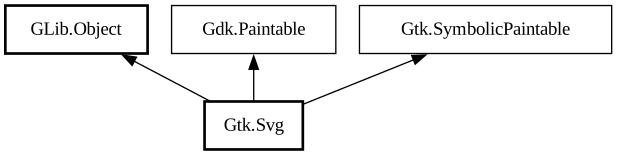
Description:
A paintable implementation that renders SVG, with animations.
`GtkSvg` objects are created by parsing a subset of SVG, including SVG animations.
`GtkSvg` fills or strokes paths with symbolic or fixed colors. It can have multiple states, and paths can be included in a subset of the states. States can have animations, and the transition between different states can also be animated.
To show a static SVG image, it is enough to load the the SVG and use it like any other paintable.
To play an SVG animation, use [method@Gtk.Svg.set_frame_clock] to connect the paintable to a frame clock, and call [method@Gtk.Svg.play] after loading the SVG. The animation can be paused using [method@Gtk.Svg.pause].
To set the current state, use [method@Gtk.Svg.set_state].
Error handling
Loading an SVG into `GtkSvg` will always produce a (possibly empty) paintable. GTK will drop things that it can't handle and try to make sense of the rest.
To track errors during parsing or rendering, connect to the [signal@Gtk.Svg:GtkSvg:error] signal.
For parsing errors in the `GTK_SVG_ERROR` domain, the functions [func@Gtk.SvgError.get_start], [func@Gtk.SvgError.get_end], [ func@Gtk.SvgError.get_element] and [func@Gtk.SvgError.get_attribute] can be used to obtain information about where the error occurred.
The supported subset of SVG
The paintable supports much of SVG 2, including animations, with some exceptions.
Among the graphical elements, `<textPath>` and `<foreignObject>` are not supported.
In the `<filter>` element, the following primitives are not supported: feConvolveMatrix, feDiffuseLighting, feMorphology, feSpecularLighting.
Support for the `mask` attribute is limited to just a url referring to the `<mask>` element by ID.
In animation elements, the parsing of `begin` and `end` attributes is limited, and the `min` and `max` attributes are not supported.
The interactive aspects of SVG are supported by [class@Gtk.SvgWidget].
SVG Extensions
The paintable supports a number of [custom attributes](icon-format.html) that offer a convenient way to define states, transitions and animations. For example,
<circle cx='5' cy='5' r='5' gpa:states='0 1' gpa:animation-type='automatic' gpa:animation-direction='segment' gpa:animation-duration='600ms'/>
defines the circle to be shown in states 0 and 1, and animates a segment of the circle.
<image src="svg-renderer1.svg">
Note that the generated animations are implemented using standard SVG attributes (`visibility`, `stroke-dasharray, `stroke-dashoffset`, `pathLength` and `filter`). Setting these attributes in your SVG is therefore going to interfere with generated animations.
To connect general SVG animations to the states of the paintable, use the custom `StateChange(...)` condition in the `begin` and `end` attributes of SVG animation elements. For example,
<animate href='path1' attributeName='fill' begin='StateChange(1 2 3, 0)' dur='300ms' fill='freeze' from='black' to='magenta'/ >
will make the fill color of path1 transition from black to magenta when the renderer enters state 0 from states 1, 2, or 3.
<image src="svg-renderer2.svg">
The `StateChange(...)` condition triggers for upcoming state changes as well, to support fade-out transitions. For example,
<animate href='path1' attributeName='opacity' begin='StateChange(0, 1 2 3) -300ms' dur='300ms' fill='freeze' from='1' to='0'/ >
will start a fade-out of path1 300ms before a transition from state 0 to 1, 2 or 3.
States can be specified numerically, or by name. It is also possible to say `not STATE` instead of explictly listing all states that are different from `STATE`.
In addition to the `gpa:fill` and `gpa:stroke` attributes, symbolic colors can also be specified as a custom paint server reference, like
this: `url(gpa:warning)`. This works in `fill` and `stroke` attributes, but also when specifying colors in SVG animation
attributes like `to` or `values`.
Note that the SVG syntax allows for a fallback RGB color to be specified after the url, for compatibility with other SVG consumers:
fill='url(gpa:warning) orange'
GtkSvg also allows to refer to symbolic colors like system colors in CSS, with names like SymbolicForeground, SymbolicSuccess, etc. These can be used whenever a color is required.
In contrast to SVG 1.1 and 2.0, we allow the `transform` attribute to be animated with `<animate>`.
Namespace: Gtk
Package: gtk4
Content:
Properties:
Creation methods:
Methods:
Signals:
Inherited Members:
All known members inherited from class GLib.Object
All known members inherited from interface Gdk.Paintable
All known members inherited from interface Gtk.SymbolicPaintable