[ CCode ( type_id = "gtk_list_base_get_type ()" ) ]
public abstract class ListBase : Widget, Accessible, Buildable, ConstraintTarget, Orientable, Scrollable
ListBase
Object Hierarchy:
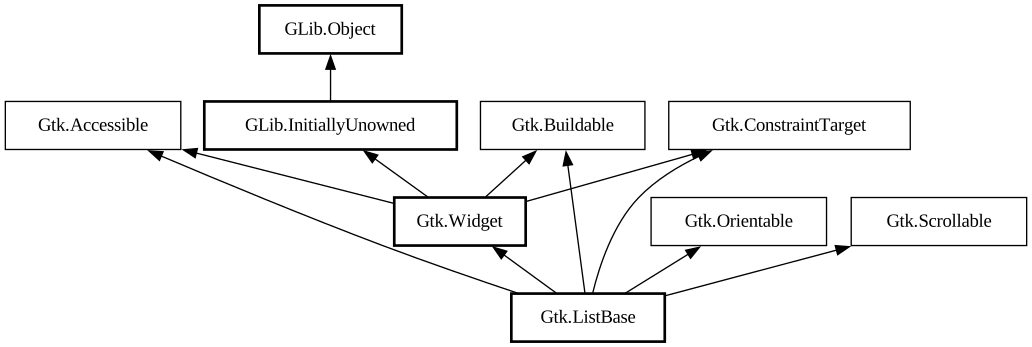
Description:
The abstract base class for GTK's list widgets.
Shortcuts and Gestures
`GtkListBase` supports the following keyboard shortcuts:
- <kbd>Ctrl</kbd>+<kbd>A</kbd> or <kbd>Ctrl</kbd>+<kbd>/</kbd> selects all items.
- <kbd>Ctrl</kbd>+<kbd>Shift</kbd>+<kbd>A</kbd> or <kbd>Ctrl</kbd>+<kbd>& bsol;</kbd> unselects all items.
The focused item is controlled by the navigation keys below, combined with the <kbd>Ctrl</kbd> modifier to prevent moving the selection, and the <kbd>Shift</kbd> modifier to extend the current selection.
- <kbd>←</kbd>, <kbd>→</kbd>, <kbd>↑</kbd>, <kbd>↓</kbd> move the focus on the next item in the designed direction.
- <kbd>Home</kbd> and <kbd>End</kbd> focus the first or last item.
- <kbd>PgUp</kbd> and <kbd>PgDn</kbd> move the focus one page up or down.
List item widgets support the following keyboard shortcuts:
- <kbd>Enter</kbd> activates the item.
- <kbd>␣</kbd> selects the item, with the same <kbd>Ctrl</kbd> and <kbd>Shift</kbd> modifiers combinations as the navigation keys.
Actions
`GtkListBase` defines a set of built-in actions:
- `list.scroll-to-item` moves the visible area to the item at given position with the minimum amount of scrolling required. If the item is already visible, nothing happens.
- `list.select-item` changes the selection.
- `list.select-all` selects all items in the model, if the selection model supports it.
- `list.unselect-all` unselects all items in the model, if the selection model supports it.
List item widgets install the following actions:
- `listitem.select` changes selection if the item is selectable.
- `listitem.scroll-to` moves the visible area of the list to this item with the minimum amount of scrolling required.
All known sub-classes:
Namespace: Gtk
Package: gtk4
Content:
Creation methods:
Inherited Members:
All known members inherited from class Gtk.Widget
All known members inherited from class GLib.Object
All known members inherited from interface Gtk.Accessible
All known members inherited from interface Gtk.Buildable
All known members inherited from interface Gtk.Orientable
All known members inherited from interface Gtk.Scrollable