[ CCode ( type_id = "clapper_gtk_video_get_type ()" ) ]
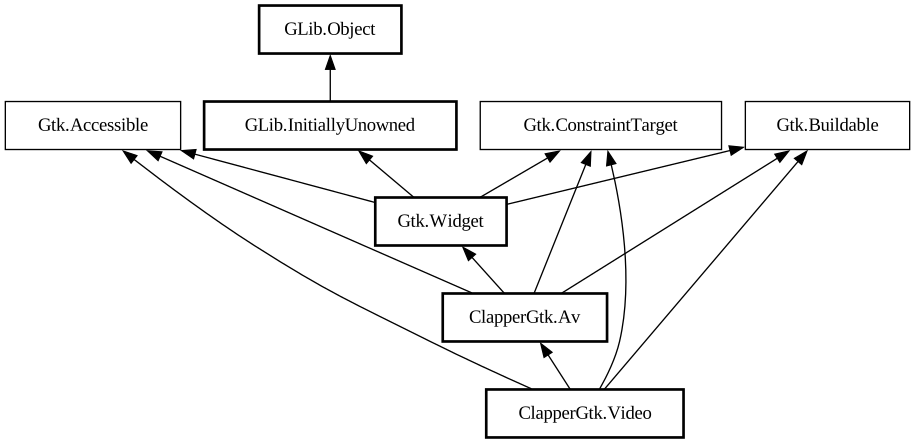
public class Video : Av, Accessible, Buildable, ConstraintTarget
Video
Object Hierarchy:
Description:
A ready to be used GTK video widget implementing Clapper API.
Video is the main widget exposed by `ClapperGtk` API. It both displays videos played by [class@Clapper.Player] (exposed as [property@ClapperGtk.Av:player] property) and manages revealing and fading of any additional widgets overlaid on top of it.
Other widgets provided by `ClapperGtk` library, once placed anywhere on video (including nesting within another widget like [ class@Gtk.Box]) will automatically control Video they were overlaid on top of. This allows to freely create custom playback control panels best suited for specific application. Additionally, pre-made widgets such as [ class@ClapperGtk.SimpleControls] are also available.
Basic usage
A typical use case is to embed video widget as part of your app where video playback is needed. Get the [class@Clapper.Player] belonging to the AV widget and start adding new [class@Clapper.MediaItem] items to the [class@Clapper.Queue] for playback. For more information please refer to the Clapper playback library documentation.
Video can automatically take care of revealing and later fading overlaid content when interacting with the video. To do this, simply add your widgets with [method@ClapperGtk.Video.add_fading_overlay]. If you want to display some static content on top of video (or take care of visibility within overlaid widget itself) you can add it to the video as a normal overlay with [ method@ClapperGtk.Video.add_overlay].
Actions
You can use built-in actions of parent [class@ClapperGtk.Av]. See its documentation, for the list of available ones.
ClapperGtkVideo as GtkBuildable
Video implementation of the [iface@Gtk.Buildable] interface supports placing children as either normal overlay by specifying `overlay` or a fading one by specifying `fading-overlay` as the `type` attribute of a `<child>` element. Position of overlaid content is determined by `valign/halign` properties.
```xml <object class="ClapperGtkVideo" id="video"> <child type="fading-overlay"> <object class="ClapperGtkTitleHeader" > <property name="valign">start</property> </object> </child> <child type="fading-overlay"> < object class="ClapperGtkSimpleControls"> <property name="valign">end</property> </object> </child> < /object> ```
Namespace: ClapperGtk
Package: clapper-gtk-0.0
Content:
Properties:
Creation methods:
Methods:
Signals:
Inherited Members:
All known members inherited from class ClapperGtk.Av
All known members inherited from class Gtk.Widget
All known members inherited from class GLib.Object
All known members inherited from interface Gtk.Accessible
All known members inherited from interface Gtk.Buildable