[ CCode ( type_id = "clapper_gtk_audio_get_type ()" ) ]
[ Version ( since = "0.10" ) ]
public class Audio : Av, Accessible, Buildable, ConstraintTarget
Audio
Object Hierarchy:
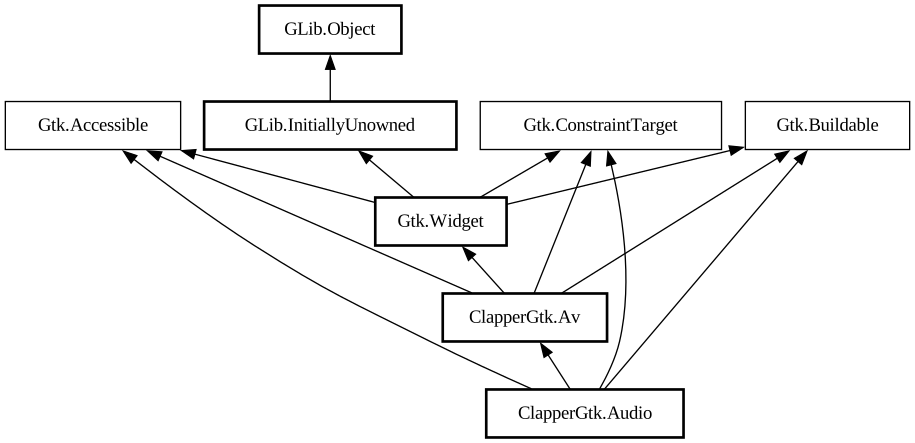
Description:
A GTK widget for audio playback with Clapper API.
Audio is a widget meant for integrating audio playback within GTK application. It exposes [ class@Clapper.Player] through its base class [property@ClapperGtk.Av:player] property.
Other widgets (buttons, seek bar, etc.) provided by `ClapperGtk` library, once placed anywhere inside audio container (including nesting within another widget like [class@Gtk.Box]) will automatically control Audio they are within. This allows to freely create custom UI best suited for specific application.
Basic usage
A typical use case is to embed audio widget as part of your app where audio playback is needed (can be even the very first child of the window). Get the [class@Clapper.Player] belonging to the AV widget and start adding new [class@Clapper.MediaItem] items to the [ class@Clapper.Queue] for playback. For more information please refer to the Clapper playback library documentation.
Actions
You can use built-in actions of parent [class@ClapperGtk.Av]. See its documentation for the list of available ones.
ClapperGtkAudio as GtkBuildable
Audio implementation of the [iface@Gtk.Buildable] interface supports placing a single widget (which might then hold multiple widgets) as `<child>` element.
```xml <object class="ClapperGtkAudio" id="audio"> <child> <object class="GtkBox"> <property name="orientation" >horizontal</property> <child> <object class="ClapperGtkPreviousItemButton"> </child> <child> < object class="ClapperGtkTogglePlayButton"> </child> <child> <object class="ClapperGtkNextItemButton"> </child > </object> </child> </object> ```
Namespace: ClapperGtk
Package: clapper-gtk-0.0
Content:
Properties:
Creation methods:
Methods:
Inherited Members:
All known members inherited from class ClapperGtk.Av
All known members inherited from class Gtk.Widget
All known members inherited from class GLib.Object
All known members inherited from interface Gtk.Accessible
All known members inherited from interface Gtk.Buildable